Introduction
-
🤖 The Yi series models are the next generation of open-source large language models trained from scratch by 01.AI.
-
🙌 Targeted as a bilingual language model and trained on 3T multilingual corpus, the Yi series models become one of the strongest LLM worldwide, showing promise in language understanding, commonsense reasoning, reading comprehension, and more. For example,
-
Yi-34B-Chat model landed in second place (following GPT-4 Turbo), outperforming other LLMs (such as GPT-4, Mixtral, Claude) on the AlpacaEval Leaderboard (based on data available up to January 2024).
-
Yi-34B model ranked first among all existing open-source models (such as Falcon-180B, Llama-70B, Claude) in both English and Chinese on various benchmarks, including Hugging Face Open LLM Leaderboard (pre-trained) and C-Eval (based on data available up to November 2023).
-
🙏 (Credits to Llama) Thanks to the Transformer and Llama open-source communities, as they reduce the efforts required to build from scratch and enable the utilization of the same tools within the AI ecosystem.
💡 TL;DR
The Yi series models adopt the same model architecture as Llama but are NOT derivatives of Llama.
-
Both Yi and Llama are based on the Transformer structure, which has been the standard architecture for large language models since 2018.
-
Grounded in the Transformer architecture, Llama has become a new cornerstone for the majority of state-of-the-art open-source models due to its excellent stability, reliable convergence, and robust compatibility. This positions Llama as the recognized foundational framework for models including Yi.
-
Thanks to the Transformer and Llama architectures, other models can leverage their power, reducing the effort required to build from scratch and enabling the utilization of the same tools within their ecosystems.
-
However, the Yi series models are NOT derivatives of Llama, as they do not use Llama's weights.
-
As Llama's structure is employed by the majority of open-source models, the key factors of determining model performance are training datasets, training pipelines, and training infrastructure.
-
Developing in a unique and proprietary way, Yi has independently created its own high-quality training datasets, efficient training pipelines, and robust training infrastructure entirely from the ground up. This effort has led to excellent performance with Yi series models ranking just behind GPT4 and surpassing Llama on the Alpaca Leaderboard in Dec 2023.
News
Yi-34B-ChatYi-34B-Chat-4bitsYi-34B-Chat-8bitsYi-6B-ChatYi-6B-Chat-4bitsYi-6B-Chat-8bits
You can try some of them interactively at:
Models
Yi models come in multiple sizes and cater to different use cases. You can also fine-tune Yi models to meet your specific requirements.
If you want to deploy Yi models, make sure you meet the software and hardware requirements.
Chat models
- 4-bit series models are quantized by AWQ. - 8-bit series models are quantized by GPTQ - All quantized models have a low barrier to use since they can be deployed on consumer-grade GPUs (e.g., 3090, 4090).
Base models
- 200k is roughly equivalent to 400,000 Chinese characters. - If you want to use the previous version of the Yi-34B-200K (released on Nov 5, 2023), run git checkout 069cd341d60f4ce4b07ec394e82b79e94f656cf to download the weight.
Model info
-
For chat models
However, this higher diversity might amplify certain existing issues, including:
Hallucination: This refers to the model generating factually incorrect or nonsensical information. With the model's responses being more varied, there's a higher chance of hallucination that are not based on accurate data or logical reasoning.
Non-determinism in re-generation: When attempting to regenerate or sample responses, inconsistencies in the outcomes may occur. The increased diversity can lead to varying results even under similar input conditions.
Cumulative Error: This occurs when errors in the model's responses compound over time. As the model generates more diverse responses, the likelihood of small inaccuracies building up into larger errors increases, especially in complex tasks like extended reasoning, mathematical problem-solving, etc.
To achieve more coherent and consistent responses, it is advisable to adjust generation configuration parameters such as temperature, top_p, or top_k. These adjustments can help in the balance between creativity and coherence in the model's outputs.
How to use Yi?
Quick start
💡 Tip: If you want to get started with the Yi model and explore different methods for inference, check out the Yi Cookbook.
Choose your path
Select one of the following paths to begin your journey with Yi!

🎯 Deploy Yi locally
If you prefer to deploy Yi models locally,
-
🙋♀️ and you have sufficient resources (for example, NVIDIA A800 80GB), you can choose one of the following methods:
-
🙋♀️ and you have limited resources (for example, a MacBook Pro), you can use llama.cpp.
🎯 Not to deploy Yi locally
If you prefer not to deploy Yi models locally, you can explore Yi's capabilities using any of the following options.
🙋♀️ Run Yi with APIs
If you want to explore more features of Yi, you can adopt one of these methods:
-
Yi APIs (Yi official)
-
Yi APIs (Replicate)
🙋♀️ Run Yi in playground
If you want to chat with Yi with more customizable options (e.g., system prompt, temperature, repetition penalty, etc.), you can try one of the following options:
🙋♀️ Chat with Yi
If you want to chat with Yi, you can use one of these online services, which offer a similar user experience:
Quick start - pip
This tutorial guides you through every step of running Yi-34B-Chat locally on an A800 (80G) and then performing inference.
Step 0: Prerequisites
Step 1: Prepare your environment
To set up the environment and install the required packages, execute the following command.
git clone https://github.com/01-ai/Yi.gitcd yipip install -r requirements.txt
Step 2: Download the Yi model
You can download the weights and tokenizer of Yi models from the following sources:
You can perform inference with Yi chat or base models as below.
-
Create a file named quick_start.py and copy the following content to it.
from transformers import AutoModelForCausalLM, AutoTokenizer model_path = '<your-model-path>' tokenizer = AutoTokenizer.from_pretrained(model_path, use_fast=False) # Since transformers 4.35.0, the GPT-Q/AWQ model can be loaded using AutoModelForCausalLM.model = AutoModelForCausalLM.from_pretrained( model_path, device_map="auto", torch_dtype='auto').eval() # Prompt content: "hi"messages = [ {"role": "user", "content": "hi"}] input_ids = tokenizer.apply_chat_template(conversation=messages, tokenize=True, add_generation_prompt=True, return_tensors='pt')output_ids = model.generate(input_ids.to('cuda'))response = tokenizer.decode(output_ids[0][input_ids.shape[1]:], skip_special_tokens=True) # Model response: "Hello! How can I assist you today?"print(response)
-
Run quick_start.py.
Then you can see an output similar to the one below. 🥳
Hello! How can I assist you today?
-
Yi-34B
The steps are similar to pip - Perform inference with Yi chat model.
You can use the existing file text_generation.py.
python demo/text_generation.py --model <your-model-path>
Then you can see an output similar to the one below. 🥳
Prompt: Let me tell you an interesting story about cat Tom and mouse Jerry,
Generation: Let me tell you an interesting story about cat Tom and mouse Jerry, which happened in my childhood. My father had a big house with two cats living inside it to kill mice. One day when I was playing at home alone, I found one of the tomcats lying on his back near our kitchen door, looking very much like he wanted something from us but couldn’t get up because there were too many people around him! He kept trying for several minutes before finally giving up...
-
Yi-9B
Input
from transformers import AutoModelForCausalLM, AutoTokenizer MODEL_DIR = "01-ai/Yi-9B"model = AutoModelForCausalLM.from_pretrained(MODEL_DIR, torch_dtype="auto")tokenizer = AutoTokenizer.from_pretrained(MODEL_DIR, use_fast=False) input_text = "# write the quick sort algorithm"inputs = tokenizer(input_text, return_tensors="pt").to(model.device)outputs = model.generate(**inputs, max_length=256)print(tokenizer.decode(outputs[0], skip_special_tokens=True))
Output
# write the quick sort algorithmdef quick_sort(arr): if len(arr) <= 1: return arr pivot = arr[len(arr) // 2] left = [x for x in arr if x < pivot] middle = [x for x in arr if x == pivot] right = [x for x in arr if x > pivot] return quick_sort(left) + middle + quick_sort(right) # test the quick sort algorithmprint(quick_sort([3, 6, 8, 10, 1, 2, 1]))
Quick start - Docker
Quick start - conda-lock
-
Install micromamba by following the instructions available here.
-
Execute micromamba install -y -n yi -f conda-lock.yml to create a conda environment named yi and install the necessary dependencies.
Quick start - llama.cpp
The following tutorial will guide you through every step of running a quantized model (Yi-chat-6B-2bits) locally and then performing inference.
Step 0: Prerequisites
Step 1: Download llama.cpp
To clone the llama.cpp repository, run the following command.
git clone git@github.com:ggerganov/llama.cpp.git
Step 2: Download Yi model
2.1 To clone XeIaso/yi-chat-6B-GGUF with just pointers, run the following command.
GIT_LFS_SKIP_SMUDGE=1 git clone https://huggingface.co/XeIaso/yi-chat-6B-GGUF
2.2 To download a quantized Yi model (yi-chat-6b.Q2_K.gguf), run the following command.
git-lfs pull --include yi-chat-6b.Q2_K.gguf
To perform inference with the Yi model, you can use one of the following methods.
To compile llama.cpp using 4 threads and then conduct inference, navigate to the llama.cpp directory, and run the following command.
Tips
-
Replace /Users/yu/yi-chat-6B-GGUF/yi-chat-6b.Q2_K.gguf with the actual path of your model.
-
By default, the model operates in completion mode.
-
For additional output customization options (for example, system prompt, temperature, repetition penalty, etc.), run ./main -h to check detailed descriptions and usage.
make -j4 && ./main -m /Users/yu/yi-chat-6B-GGUF/yi-chat-6b.Q2_K.gguf -p "How do you feed your pet fox? Please answer this question in 6 simple steps:\nStep 1:" -n 384 -e ... How do you feed your pet fox? Please answer this question in 6 simple steps: Step 1: Select the appropriate food for your pet fox. You should choose high-quality, balanced prey items that are suitable for their unique dietary needs. These could include live or frozen mice, rats, pigeons, or other small mammals, as well as fresh fruits and vegetables. Step 2: Feed your pet fox once or twice a day, depending on the species and its individual preferences. Always ensure that they have access to fresh water throughout the day. Step 3: Provide an appropriate environment for your pet fox. Ensure it has a comfortable place to rest, plenty of space to move around, and opportunities to play and exercise. Step 4: Socialize your pet with other animals if possible. Interactions with other creatures can help them develop social skills and prevent boredom or stress. Step 5: Regularly check for signs of illness or discomfort in your fox. Be prepared to provide veterinary care as needed, especially for common issues such as parasites, dental health problems, or infections. Step 6: Educate yourself about the needs of your pet fox and be aware of any potential risks or concerns that could affect their well-being. Regularly consult with a veterinarian to ensure you are providing the best care. ...
Now you have successfully asked a question to the Yi model and got an answer! 🥳
-
To initialize a lightweight and swift chatbot, run the following command.
cd llama.cpp./server --ctx-size 2048 --host 0.0.0.0 --n-gpu-layers 64 --model /Users/yu/yi-chat-6B-GGUF/yi-chat-6b.Q2_K.gguf
Then you can get an output like this:
... llama_new_context_with_model: n_ctx = 2048llama_new_context_with_model: freq_base = 5000000.0llama_new_context_with_model: freq_scale = 1ggml_metal_init: allocatingggml_metal_init: found device: Apple M2 Proggml_metal_init: picking default device: Apple M2 Proggml_metal_init: ggml.metallib not found, loading from sourceggml_metal_init: GGML_METAL_PATH_RESOURCES = nilggml_metal_init: loading '/Users/yu/llama.cpp/ggml-metal.metal'ggml_metal_init: GPU name: Apple M2 Proggml_metal_init: GPU family: MTLGPUFamilyApple8 (1008)ggml_metal_init: hasUnifiedMemory = trueggml_metal_init: recommendedMaxWorkingSetSize = 11453.25 MBggml_metal_init: maxTransferRate = built-in GPUggml_backend_metal_buffer_type_alloc_buffer: allocated buffer, size = 128.00 MiB, ( 2629.44 / 10922.67)llama_new_context_with_model: KV self size = 128.00 MiB, K (f16): 64.00 MiB, V (f16): 64.00 MiBggml_backend_metal_buffer_type_alloc_buffer: allocated buffer, size = 0.02 MiB, ( 2629.45 / 10922.67)llama_build_graph: non-view tensors processed: 676/676llama_new_context_with_model: compute buffer total size = 159.19 MiBggml_backend_metal_buffer_type_alloc_buffer: allocated buffer, size = 156.02 MiB, ( 2785.45 / 10922.67)Available slots:-> Slot 0 - max context: 2048 llama server listening at http://0.0.0.0:8080
-
To access the chatbot interface, open your web browser and enter http://0.0.0.0:8080 into the address bar.

-
Enter a question, such as "How do you feed your pet fox? Please answer this question in 6 simple steps" into the prompt window, and you will receive a corresponding answer.

Web demo
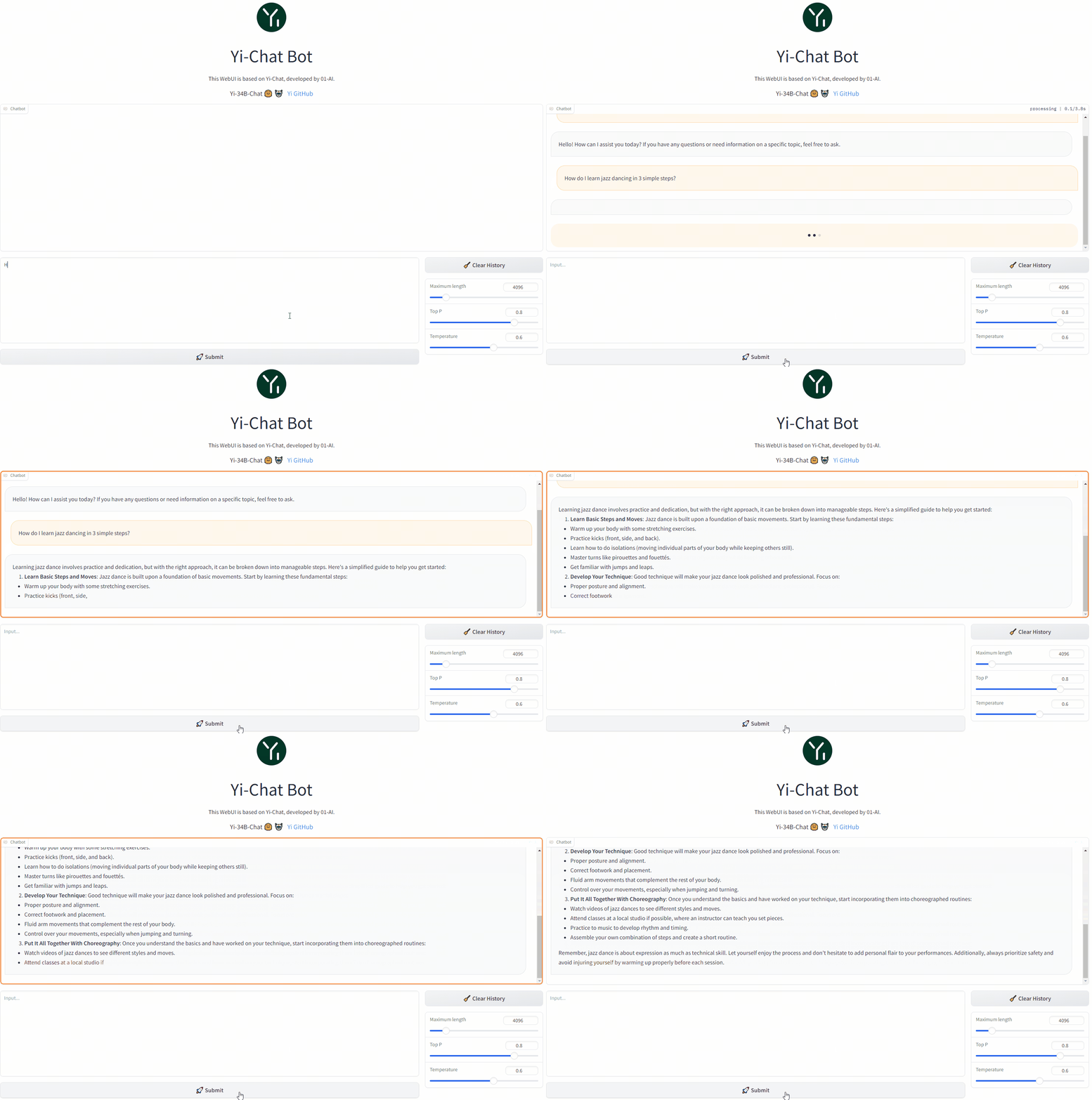
You can build a web UI demo for Yi chat models (note that Yi base models are not supported in this senario).
Step 1: Prepare your environment.
Step 2: Download the Yi model.
Step 3. To start a web service locally, run the following command.
python demo/web_demo.py -c <your-model-path>
You can access the web UI by entering the address provided in the console into your browser.
Fine-tuning
bash finetune/scripts/run_sft_Yi_6b.sh
Once finished, you can compare the finetuned model and the base model with the following command:
bash finetune/scripts/run_eval.sh
Finetune code for Yi 6B and 34B
Preparation
From Image
By default, we use a small dataset from BAAI/COIG to finetune the base model.
You can also prepare your customized dataset in the following jsonl format:
{ "prompt": "Human: Who are you? Assistant:", "chosen": "I'm Yi." }
And then mount them in the container to replace the default ones:
docker run -it \ -v /path/to/save/finetuned/model/:/finetuned-model \ -v /path/to/train.jsonl:/yi/finetune/data/train.json \ -v /path/to/eval.jsonl:/yi/finetune/data/eval.json \ ghcr.io/01-ai/yi:latest \ bash finetune/scripts/run_sft_Yi_6b.sh
From Local Server
Make sure you have conda. If not, use
mkdir -p ~/miniconda3wget https://repo.anaconda.com/miniconda/Miniconda3-latest-Linux-x86_64.sh -O ~/miniconda3/miniconda.shbash ~/miniconda3/miniconda.sh -b -u -p ~/miniconda3rm -rf ~/miniconda3/miniconda.sh~/miniconda3/bin/conda init bashsource ~/.bashrc
Then, create a conda env:
conda create -n dev_env python=3.10 -yconda activate dev_envpip install torch==2.0.1 deepspeed==0.10 tensorboard transformers datasets sentencepiece accelerate ray==2.7
Hardware Setup
For the Yi-6B model, a node with 4 GPUs, each with GPU memory larger than 60GB, is recommended.
For the Yi-34B model, because the usage of the zero-offload technique consumes a lot of CPU memory, please be careful to limit the number of GPUs in the 34B finetune training. Please use CUDA_VISIBLE_DEVICES to limit the number of GPUs (as shown in scripts/run_sft_Yi_34b.sh).
A typical hardware setup for finetuning the 34B model is a node with 8 GPUs (limited to 4 in running by CUDA_VISIBLE_DEVICES=0,1,2,3), each with GPU memory larger than 80GB, and total CPU memory larger than 900GB.
Quick Start
Download a LLM-base model to MODEL_PATH (6B and 34B). A typical folder of models is like:
|-- $MODEL_PATH| |-- config.json| |-- pytorch_model-00001-of-00002.bin| |-- pytorch_model-00002-of-00002.bin| |-- pytorch_model.bin.index.json| |-- tokenizer_config.json| |-- tokenizer.model| |-- ...
Download a dataset from huggingface to local storage DATA_PATH, e.g. Dahoas/rm-static.
|-- $DATA_PATH| |-- data| | |-- train-00000-of-00001-2a1df75c6bce91ab.parquet| | |-- test-00000-of-00001-8c7c51afc6d45980.parquet| |-- dataset_infos.json| |-- README.md
finetune/yi_example_dataset has example datasets, which are modified from BAAI/COIG
|-- $DATA_PATH |--data |-- train.jsonl |-- eval.jsonl
cd into the scripts folder, copy and paste the script, and run. For example:
cd finetune/scripts bash run_sft_Yi_6b.sh
For the Yi-6B base model, setting training_debug_steps=20 and num_train_epochs=4 can output a chat model, which takes about 20 minutes.
For the Yi-34B base model, it takes a relatively long time for initialization. Please be patient.
Evaluation
cd finetune/scripts bash run_eval.sh
Then you'll see the answer from both the base model and the finetuned model.
Quantization
GPT-Q
python quantization/gptq/quant_autogptq.py \ --model /base_model \ --output_dir /quantized_model \ --trust_remote_code
Once finished, you can then evaluate the resulting model as follows:
python quantization/gptq/eval_quantized_model.py \ --model /quantized_model \ --trust_remote_code
GPT-Q quantization
GPT-Q is a PTQ (Post-Training Quantization)
method. It saves memory and provides potential speedups while retaining the accuracy
of the model.
Yi models can be GPT-Q quantized without a lot of efforts.
We provide a step-by-step tutorial below.
To run GPT-Q, we will use AutoGPTQ and
exllama.
And the huggingface transformers has integrated optimum and auto-gptq to perform
GPTQ quantization on language models.
Do Quantization
The quant_autogptq.py script is provided for you to perform GPT-Q quantization:
python quant_autogptq.py --model /base_model \ --output_dir /quantized_model --bits 4 --group_size 128 --trust_remote_code
Run Quantized Model
You can run a quantized model using the eval_quantized_model.py:
python eval_quantized_model.py --model /quantized_model --trust_remote_code
AWQ
python quantization/awq/quant_autoawq.py \ --model /base_model \ --output_dir /quantized_model \ --trust_remote_code
Once finished, you can then evaluate the resulting model as follows:
python quantization/awq/eval_quantized_model.py \ --model /quantized_model \ --trust_remote_code
AWQ quantization
AWQ is a PTQ (Post-Training Quantization)
method. It's an efficient and accurate low-bit weight quantization (INT3/4) for LLMs.
Yi models can be AWQ quantized without a lot of efforts.
We provide a step-by-step tutorial below.
To run AWQ, we will use AutoAWQ.
Do Quantization
The quant_autoawq.py script is provided for you to perform AWQ quantization:
python quant_autoawq.py --model /base_model \ --output_dir /quantized_model --bits 4 --group_size 128 --trust_remote_code
Run Quantized Model
You can run a quantized model using the eval_quantized_model.py:
python eval_quantized_model.py --model /quantized_model --trust_remote_code
Deployment
If you want to deploy Yi models, make sure you meet the software and hardware requirements.
Software requirements
Before using Yi quantized models, make sure you've installed the correct software listed below.
Hardware requirements
Before deploying Yi in your environment, make sure your hardware meets the following requirements.
Chat models
Table with columns: Model, Minimum VRAM, Recommended GPU Example| Model | Minimum VRAM | Recommended GPU Example |
|---|
| Yi-6B-Chat | 15 GB | 1 x RTX 3090 (24 GB) 1 x RTX 4090 (24 GB) 1 x A10 (24 GB) 1 x A30 (24 GB) |
| Yi-6B-Chat-4bits | 4 GB | 1 x RTX 3060 (12 GB) 1 x RTX 4060 (8 GB) |
| Yi-6B-Chat-8bits | 8 GB | 1 x RTX 3070 (8 GB) 1 x RTX 4060 (8 GB) |
| Yi-34B-Chat | 72 GB | 4 x RTX 4090 (24 GB) 1 x A800 (80GB) |
| Yi-34B-Chat-4bits | 20 GB | 1 x RTX 3090 (24 GB) 1 x RTX 4090 (24 GB) 1 x A10 (24 GB) 1 x A30 (24 GB) 1 x A100 (40 GB) |
| Yi-34B-Chat-8bits | 38 GB | 2 x RTX 3090 (24 GB) 2 x RTX 4090 (24 GB) 1 x A800 (40 GB) |
Below are detailed minimum VRAM requirements under different batch use cases.
Table with columns: Model, batch=1, batch=4, batch=16, batch=32| Model | batch=1 | batch=4 | batch=16 | batch=32 |
|---|
| Yi-6B-Chat | 12 GB | 13 GB | 15 GB | 18 GB |
| Yi-6B-Chat-4bits | 4 GB | 5 GB | 7 GB | 10 GB |
| Yi-6B-Chat-8bits | 7 GB | 8 GB | 10 GB | 14 GB |
| Yi-34B-Chat | 65 GB | 68 GB | 76 GB | > 80 GB |
| Yi-34B-Chat-4bits | 19 GB | 20 GB | 30 GB | 40 GB |
| Yi-34B-Chat-8bits | 35 GB | 37 GB | 46 GB | 58 GB |
Base models
Table with columns: Model, Minimum VRAM, Recommended GPU Example| Model | Minimum VRAM | Recommended GPU Example |
|---|
| Yi-6B | 15 GB | 1 x RTX 3090 (24 GB) 1 x RTX 4090 (24 GB) 1 x A10 (24 GB) 1 x A30 (24 GB) |
| Yi-6B-200K | 50 GB | 1 x A800 (80 GB) |
| Yi-9B | 20 GB | 1 x RTX 4090 (24 GB) |
| Yi-34B | 72 GB | 4 x RTX 4090 (24 GB) 1 x A800 (80 GB) |
| Yi-34B-200K | 200 GB | 4 x A800 (80 GB) |
FAQ
💡Fine-tuning
- Base model or Chat model - which to fine-tune?
The choice of pre-trained language model for fine-tuning hinges on the computational resources you have at your disposal and the particular demands of your task.
- If you are working with a substantial volume of fine-tuning data (say, over 10,000 samples), the Base model could be your go-to choice.
- On the other hand, if your fine-tuning data is not quite as extensive, opting for the Chat model might be a more fitting choice.
- It is generally advisable to fine-tune both the Base and Chat models, compare their performance, and then pick the model that best aligns with your specific requirements.
- Yi-34B versus Yi-34B-Chat for full-scale fine-tuning - what is the difference?
The key distinction between full-scale fine-tuning on
Yi-34Band Yi-34B-Chat comes down to the fine-tuning approach and outcomes.
- Yi-34B-Chat employs a Special Fine-Tuning (SFT) method, resulting in responses that mirror human conversation style more closely.
- The Base model's fine-tuning is more versatile, with a relatively high performance potential.
- If you are confident in the quality of your data, fine-tuning with
Yi-34B could be your go-to.
- If you are aiming for model-generated responses that better mimic human conversational style, or if you have doubts about your data quality,
Yi-34B-Chat might be your best bet.
💡Quantization
- Quantized model versus original model - what is the performance gap?
- The performance variance is largely contingent on the quantization method employed and the specific use cases of these models. For instance, when it comes to models provided by the AWQ official, from a Benchmark standpoint, quantization might result in a minor performance drop of a few percentage points.
- Subjectively speaking, in situations like logical reasoning, even a 1% performance shift could impact the accuracy of the output results.
💡General
-
Where can I source fine-tuning question answering datasets?
- You can find fine-tuning question answering datasets on platforms like Hugging Face, with datasets like m-a-p/COIG-CQIA readily available.
- Additionally, Github offers fine-tuning frameworks, such as hiyouga/LLaMA-Factory, which integrates pre-made datasets.
-
What is the GPU memory requirement for fine-tuning Yi-34B FP16?
The GPU memory needed for fine-tuning 34B FP16 hinges on the specific fine-tuning method employed. For full parameter fine-tuning, you'll need 8 GPUs each with 80 GB; however, more economical solutions like Lora require less. For more details, check out hiyouga/LLaMA-Factory. Also, consider using BF16 instead of FP16 for fine-tuning to optimize performance.
-
Are there any third-party platforms that support chat functionality for the Yi-34b-200k model?
If you're looking for third-party Chats, options include fireworks.ai.
Learning hub
Welcome to the Yi learning hub!
Whether you're a seasoned developer or a newcomer, you can find a wealth of helpful educational resources to enhance your understanding and skills with Yi models, including insightful blog posts, comprehensive video tutorials, hands-on guides, and more.
The content you find here has been generously contributed by knowledgeable Yi experts and passionate enthusiasts. We extend our heartfelt gratitude for your invaluable contributions!
At the same time, we also warmly invite you to join our collaborative effort by contributing to Yi. If you have already made contributions to Yi, please don't hesitate to showcase your remarkable work in the table below.
With all these resources at your fingertips, you're ready to start your exciting journey with Yi. Happy learning! 🥳
Tutorials
Blog tutorials
GitHub Project
Video tutorials
Table with columns: Deliverable, Date, Author| Deliverable | Date | Author |
|---|
| Run dolphin-2.2-yi-34b on IoT Devices | 2023-11-30 | Second State |
| 只需 24G 显存,用 vllm 跑起来 Yi-34B 中英双语大模型 | 2023-12-28 | 漆妮妮 |
| Install Yi 34B Locally - Chinese English Bilingual LLM | 2023-11-05 | Fahd Mirza |
| Dolphin Yi 34b - Brand New Foundational Model TESTED | 2023-11-27 | Matthew Berman |
| Yi-VL-34B 多模态大模型 - 用两张 A40 显卡跑起来 | 2024-01-28 | 漆妮妮 |
| 4060Ti 16G显卡安装零一万物最新开源的Yi-1.5版大语言模型 | 2024-05-14 | titan909 |
| Yi-1.5: True Apache 2.0 Competitor to LLAMA-3 | 2024-05-13 | Prompt Engineering |
| Install Yi-1.5 Model Locally - Beats Llama 3 in Various Benchmarks | 2024-05-13 | Fahd Mirza |
| how to install Ollama and run Yi 6B | 2024-05-13 | Ridaa Davids |
| 地表最强混合智能AI助手:llama3_70B+Yi_34B+Qwen1.5_110B | 2024-05-04 | 朱扎特 |
| ChatDoc学术论文辅助--基于Yi-34B和langchain进行PDF知识库问答 | 2024-05-03 | 朱扎特 |
| 基于Yi-34B的领域知识问答项目演示 | 2024-05-02 | 朱扎特 |
| 使用RTX4090+GaLore算法 全参微调Yi-6B大模型 | 2024-03-24 | 小工蚂创始人 |
| 无内容审查NSFW大语言模型Yi-34B-Chat蒸馏版测试,RolePlay,《天龙八部》马夫人康敏,本地GPU,CPU运行 | 2024-03-20 | 刘悦的技术博客 |
| 无内容审查NSFW大语言模型整合包,Yi-34B-Chat,本地CPU运行,角色扮演潘金莲 | 2024-03-16 | 刘悦的技术博客 |
| 量化 Yi-34B-Chat 并在单卡 RTX 4090 使用 vLLM 部署 | 2024-03-05 | 白鸽巢 |
| Yi-VL-34B(5):使用3个3090显卡24G版本,运行Yi-VL-34B模型,支持命令行和web界面方式,理解图片的内容转换成文字 | 2024-02-27 | fly-iot |
| Win环境KoboldCpp本地部署大语言模型进行各种角色扮演游戏 | 2024-02-25 | 魚蟲蟲 |
| 无需显卡本地部署Yi-34B-Chat进行角色扮演游戏 P2 | 2024-02-23 | 魚蟲蟲 |
| 【wails】(2):使用go-llama.cpp 运行 yi-01-6b大模型,使用本地CPU运行,速度还可以,等待下一版本更新 | 2024-02-20 | fly-iot |
| 【xinference】(6):在autodl上,使用xinference部署yi-vl-chat和qwen-vl-chat模型,可以使用openai调用成功 | 2024-02-06 | fly-iot |
| 无需显卡本地部署Yi-34B-Chat进行角色扮演游戏 P1 | 2024-02-05 | 魚蟲蟲 |
| 2080Ti部署YI-34B大模型 xinference-oneapi-fastGPT本地知识库使用指南 | 2024-01-30 | 小饭护法要转码 |
| Best Story Writing AI Model - Install Yi 6B 200K Locally on Windows | 2024-01-22 | Fahd Mirza |
| Mac 本地运行大语言模型方法与常见问题指南(Yi 34B 模型+32 GB 内存测试) | 2024-01-21 | 小吴苹果机器人 |
| 【Dify知识库】(11):Dify0.4.9改造支持MySQL,成功接入yi-6b 做对话,本地使用fastchat启动,占8G显存,完成知识库配置 | 2024-01-21 | fly-iot |
| 这位LLM先生有点暴躁,用的是YI-6B的某个量化版,#LLM #大语言模型 #暴躁老哥 | 2024-01-20 | 晓漫吧 |
| 大模型推理 NvLink 桥接器有用吗|双卡 A6000 测试一下 | 2024-01-17 | 漆妮妮 |
| 大模型推理 A40 vs A6000 谁更强 - 对比 Yi-34B 的单、双卡推理性能 | 2024-01-15 | 漆妮妮 |
| C-Eval 大语言模型评测基准- 用 LM Evaluation Harness + vLLM 跑起来 | 2024-01-11 | 漆妮妮 |
| 双显卡部署 Yi-34B 大模型 - vLLM + Gradio 踩坑记录 | 2024-01-01 | 漆妮妮 |
| 手把手教学!使用 vLLM 快速部署 Yi-34B-Chat | 2023-12-26 | 白鸽巢 |
| 如何训练企业自己的大语言模型?Yi-6B LORA微调演示 #小工蚁 | 2023-12-21 | 小工蚂创始人 |
| Yi-34B(4):使用4个2080Ti显卡11G版本,运行Yi-34B模型,5年前老显卡是支持的,可以正常运行,速度 21 words/s | 2023-12-02 | fly-iot |
| 使用autodl服务器,RTX 3090 * 3 显卡上运行, Yi-34B-Chat模型,显存占用60G | 2023-12-01 | fly-iot |
| 使用autodl服务器,两个3090显卡上运行, Yi-34B-Chat-int4模型,用vllm优化,增加 --num-gpu 2,速度23 words/s | 2023-12-01 | fly-iot |
| Yi大模型一键本地部署 技术小白玩转AI | 2023-12-01 | 技术小白玩转AI |
| 01.AI's Yi-6B: Overview and Fine-Tuning | 2023-11-28 | AI Makerspace |
| Yi 34B Chat LLM outperforms Llama 70B | 2023-11-27 | DLExplorer |
| How to run open source models on mac Yi 34b on m3 Max | 2023-11-26 | TECHNO PREMIUM |
| Yi-34B - 200K - The BEST & NEW CONTEXT WINDOW KING | 2023-11-24 | Prompt Engineering |
| Yi 34B : The Rise of Powerful Mid-Sized Models - Base,200k & Chat | 2023-11-24 | Sam Witteveen |
| 在IoT设备运行破解版李开复大模型dolphin-2.2-yi-34b(还可作为私有OpenAI API服务器) | 2023-11-15 | Second State |
| Run dolphin-2.2-yi-34b on IoT Devices (Also works as a Private OpenAI API Server) | 2023-11-14 | Second State |
| How to Install Yi 34B 200K Llamafied on Windows Laptop | 2023-11-11 | Fahd Mirza |
Why Yi?
Ecosystem
Yi has a comprehensive ecosystem, offering a range of tools, services, and models to enrich your experiences and maximize productivity.
Upstream
The Yi series models follow the same model architecture as Llama. By choosing Yi, you can leverage existing tools, libraries, and resources within the Llama ecosystem, eliminating the need to create new tools and enhancing development efficiency.
For example, the Yi series models are saved in the format of the Llama model. You can directly use LlamaForCausalLM and LlamaTokenizer to load the model. For more information, see Use the chat model.
from transformers import AutoModelForCausalLM, AutoTokenizer tokenizer = AutoTokenizer.from_pretrained("01-ai/Yi-34b", use_fast=False) model = AutoModelForCausalLM.from_pretrained("01-ai/Yi-34b", device_map="auto")
Downstream
💡 Tip
-
Feel free to create a PR and share the fantastic work you've built using the Yi series models.
-
To help others quickly understand your work, it is recommended to use the format of <model-name>: <model-intro> + <model-highlights>.
Serving
If you want to get up with Yi in a few minutes, you can use the following services built upon Yi.
-
Yi-34B-Chat: you can chat with Yi using one of the following platforms:
-
Yi-6B-Chat (Replicate): you can use this model with more options by setting additional parameters and calling APIs.
-
ScaleLLM: you can use this service to run Yi models locally with added flexibility and customization.
Quantization
If you have limited computational capabilities, you can use Yi's quantized models as follows.
These quantized models have reduced precision but offer increased efficiency, such as faster inference speed and smaller RAM usage.
Fine-tuning
If you're seeking to explore the diverse capabilities within Yi's thriving family, you can delve into Yi's fine-tuned models as below.
API
- amazing-openai-api: this tool converts Yi model APIs into the OpenAI API format out of the box.
- LlamaEdge: this tool builds an OpenAI-compatible API server for Yi-34B-Chat using a portable Wasm (WebAssembly) file, powered by Rust.
Tech report
For detailed capabilities of the Yi series model, see Yi: Open Foundation Models by 01.AI.
Citation
@misc{ai2024yi, title={Yi: Open Foundation Models by 01.AI}, author={01. AI and : and Alex Young and Bei Chen and Chao Li and Chengen Huang and Ge Zhang and Guanwei Zhang and Heng Li and Jiangcheng Zhu and Jianqun Chen and Jing Chang and Kaidong Yu and Peng Liu and Qiang Liu and Shawn Yue and Senbin Yang and Shiming Yang and Tao Yu and Wen Xie and Wenhao Huang and Xiaohui Hu and Xiaoyi Ren and Xinyao Niu and Pengcheng Nie and Yuchi Xu and Yudong Liu and Yue Wang and Yuxuan Cai and Zhenyu Gu and Zhiyuan Liu and Zonghong Dai}, year={2024}, eprint={2403.04652}, archivePrefix={arXiv}, primaryClass={cs.CL}}
Benchmarks
Yi-34B-Chat model demonstrates exceptional performance, ranking first among all existing open-source models in the benchmarks including MMLU, CMMLU, BBH, GSM8k, and more.

- Evaluation methods: we evaluated various benchmarks using both zero-shot and few-shot methods, except for TruthfulQA.
- Zero-shot vs. few-shot: in chat models, the zero-shot approach is more commonly employed.
- Evaluation strategy: our evaluation strategy involves generating responses while following instructions explicitly or implicitly (such as using few-shot examples). We then isolate relevant answers from the generated text.
- Challenges faced: some models are not well-suited to produce output in the specific format required by instructions in few datasets, which leads to suboptimal results.
*: C-Eval results are evaluated on the validation datasets
Yi-34B and Yi-34B-200K
The Yi-34B and Yi-34B-200K models stand out as the top performers among open-source models, especially excelling in MMLU, CMMLU, common-sense reasoning, reading comprehension, and more.

- Disparity in results: while benchmarking open-source models, a disparity has been noted between results from our pipeline and those reported by public sources like OpenCompass.
- Investigation findings: a deeper investigation reveals that variations in prompts, post-processing strategies, and sampling techniques across models may lead to significant outcome differences.
- Uniform benchmarking process: our methodology aligns with the original benchmarks—consistent prompts and post-processing strategies are used, and greedy decoding is applied during evaluations without any post-processing for the generated content.
- Efforts to retrieve unreported scores: for scores that were not reported by the original authors (including scores reported with different settings), we try to get results with our pipeline.
- Extensive model evaluation: to evaluate the model’s capability extensively, we adopted the methodology outlined in Llama2. Specifically, we included PIQA, SIQA, HellaSwag, WinoGrande, ARC, OBQA, and CSQA to assess common sense reasoning. SquAD, QuAC, and BoolQ were incorporated to evaluate reading comprehension.
- Special configurations: CSQA was exclusively tested using a 7-shot setup, while all other tests were conducted with a 0-shot configuration. Additionally, we introduced GSM8K (8-shot@1), MATH (4-shot@1), HumanEval (0-shot@1), and MBPP (3-shot@1) under the category "Math & Code".
- Falcon-180B caveat: Falcon-180B was not tested on QuAC and OBQA due to technical constraints. Its performance score is an average from other tasks, and considering the generally lower scores of these two tasks, Falcon-180B's capabilities are likely not underestimated.
Yi-9B
Yi-9B is almost the best among a range of similar-sized open-source models (including Mistral-7B, SOLAR-10.7B, Gemma-7B, DeepSeek-Coder-7B-Base-v1.5 and more), particularly excelling in code, math, common-sense reasoning, and reading comprehension.

-
In terms of overall ability (Mean-All), Yi-9B performs the best among similarly sized open-source models, surpassing DeepSeek-Coder, DeepSeek-Math, Mistral-7B, SOLAR-10.7B, and Gemma-7B.

-
In terms of coding ability (Mean-Code), Yi-9B's performance is second only to DeepSeek-Coder-7B, surpassing Yi-34B, SOLAR-10.7B, Mistral-7B, and Gemma-7B.

-
In terms of math ability (Mean-Math), Yi-9B's performance is second only to DeepSeek-Math-7B, surpassing SOLAR-10.7B, Mistral-7B, and Gemma-7B.

-
In terms of common sense and reasoning ability (Mean-Text), Yi-9B's performance is on par with Mistral-7B, SOLAR-10.7B, and Gemma-7B.

Who can use Yi?
Everyone! 🙌 ✅
The code and weights of the Yi series models are distributed under the Apache 2.0 license, which means the Yi series models are free for personal usage, academic purposes, and commercial use.
Misc.
Acknowledgments
A heartfelt thank you to each of you who have made contributions to the Yi community! You have helped Yi not just a project, but a vibrant, growing home for innovation.

Disclaimer
We use data compliance checking algorithms during the training process, to
ensure the compliance of the trained model to the best of our ability. Due to
complex data and the diversity of language model usage scenarios, we cannot
guarantee that the model will generate correct, and reasonable output in all
scenarios. Please be aware that there is still a risk of the model producing
problematic outputs. We will not be responsible for any risks and issues
resulting from misuse, misguidance, illegal usage, and related misinformation,
as well as any associated data security concerns.
License
The code and weights of the Yi-1.5 series models are distributed under the Apache 2.0 license.
If you create derivative works based on this model, please include the following attribution in your derivative works:
This work is a derivative of [The Yi Series Model You Base On] by 01.AI, used under the Apache 2.0 License.

