Highlights
We introduce the updated version of the Qwen3-30B-A3B non-thinking mode, named Qwen3-30B-A3B-Instruct-2507, featuring the following key enhancements:
- Significant improvements in general capabilities, including instruction following, logical reasoning, text comprehension, mathematics, science, coding and tool usage.
- Substantial gains in long-tail knowledge coverage across multiple languages.
- Markedly better alignment with user preferences in subjective and open-ended tasks, enabling more helpful responses and higher-quality text generation.
- Enhanced capabilities in 256K long-context understanding.
Model Overview
Qwen3-30B-A3B-Instruct-2507 has the following features:
- Type: Causal Language Models
- Training Stage: Pretraining & Post-training
- Number of Parameters: 30.5B in total and 3.3B activated
- Number of Paramaters (Non-Embedding): 29.9B
- Number of Layers: 48
- Number of Attention Heads (GQA): 32 for Q and 4 for KV
- Number of Experts: 128
- Number of Activated Experts: 8
- Context Length: 262,144 natively.
NOTE: This model supports only non-thinking mode and does not generate <think></think> blocks in its output. Meanwhile, specifying enable_thinking=False is no longer required.
For more details, including benchmark evaluation, hardware requirements, and inference performance, please refer to our blog, GitHub, and Documentation.
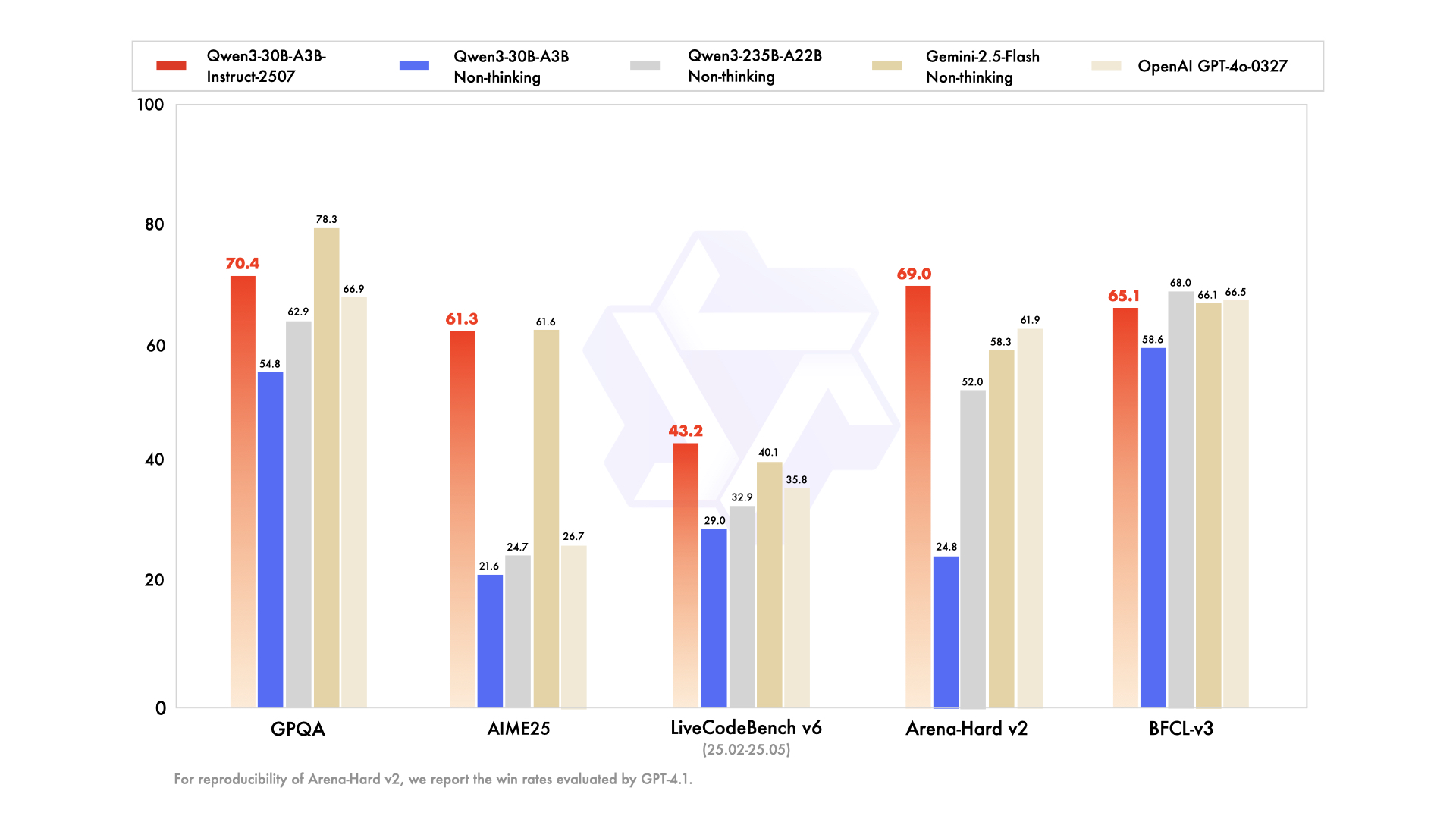
Table with columns: Deepseek-V3-0324, GPT-4o-0327, Gemini-2.5-Flash Non-Thinking, Qwen3-235B-A22B Non-Thinking, Qwen3-30B-A3B Non-Thinking, Qwen3-30B-A3B-Instruct-2507 | Deepseek-V3-0324 | GPT-4o-0327 | Gemini-2.5-Flash Non-Thinking | Qwen3-235B-A22B Non-Thinking | Qwen3-30B-A3B Non-Thinking | Qwen3-30B-A3B-Instruct-2507 |
|---|
| Knowledge | | | | | | |
| MMLU-Pro | 81.2 | 79.8 | 81.1 | 75.2 | 69.1 | 78.4 |
| MMLU-Redux | 90.4 | 91.3 | 90.6 | 89.2 | 84.1 | 89.3 |
| GPQA | 68.4 | 66.9 | 78.3 | 62.9 | 54.8 | 70.4 |
| SuperGPQA | 57.3 | 51.0 | 54.6 | 48.2 | 42.2 | 53.4 |
| Reasoning | | | | | | |
| AIME25 | 46.6 | 26.7 | 61.6 | 24.7 | 21.6 | 61.3 |
| HMMT25 | 27.5 | 7.9 | 45.8 | 10.0 | 12.0 | 43.0 |
| ZebraLogic | 83.4 | 52.6 | 57.9 | 37.7 | 33.2 | 90.0 |
| LiveBench 20241125 | 66.9 | 63.7 | 69.1 | 62.5 | 59.4 | 69.0 |
| Coding | | | | | | |
| LiveCodeBench v6 (25.02-25.05) | 45.2 | 35.8 | 40.1 | 32.9 | 29.0 | 43.2 |
| MultiPL-E | 82.2 | 82.7 | 77.7 | 79.3 | 74.6 | 83.8 |
| Aider-Polyglot | 55.1 | 45.3 | 44.0 | 59.6 | 24.4 | 35.6 |
| Alignment | | | | | | |
| IFEval | 82.3 | 83.9 | 84.3 | 83.2 | 83.7 | 84.7 |
| Arena-Hard v2* | 45.6 | 61.9 | 58.3 | 52.0 | 24.8 | 69.0 |
| Creative Writing v3 | 81.6 | 84.9 | 84.6 | 80.4 | 68.1 | 86.0 |
| WritingBench | 74.5 | 75.5 | 80.5 | 77.0 | 72.2 | 85.5 |
| Agent | | | | | | |
| BFCL-v3 | 64.7 | 66.5 | 66.1 | 68.0 | 58.6 | 65.1 |
| TAU1-Retail | 49.6 | 60.3# | 65.2 | 65.2 | 38.3 | 59.1 |
| TAU1-Airline | 32.0 | 42.8# | 48.0 | 32.0 | 18.0 | 40.0 |
| TAU2-Retail | 71.1 | 66.7# | 64.3 | 64.9 | 31.6 | 57.0 |
| TAU2-Airline | 36.0 | 42.0# | 42.5 | 36.0 | 18.0 | 38.0 |
| TAU2-Telecom | 34.0 | 29.8# | 16.9 | 24.6 | 18.4 | 12.3 |
| Multilingualism | | | | | | |
| MultiIF | 66.5 | 70.4 | 69.4 | 70.2 | 70.8 | 67.9 |
| MMLU-ProX | 75.8 | 76.2 | 78.3 | 73.2 | 65.1 | 72.0 |
| INCLUDE | 80.1 | 82.1 | 83.8 | 75.6 | 67.8 | 71.9 |
| PolyMATH | 32.2 | 25.5 | 41.9 | 27.0 | 23.3 | 43.1 |
*: For reproducibility, we report the win rates evaluated by GPT-4.1.
#: Results were generated using GPT-4o-20241120, as access to the native function calling API of GPT-4o-0327 was unavailable.
Quickstart
The code of Qwen3-MoE has been in the latest Hugging Face transformers and we advise you to use the latest version of transformers.
With transformers<4.51.0, you will encounter the following error:
The following contains a code snippet illustrating how to use the model generate content based on given inputs.
from transformers import AutoModelForCausalLM, AutoTokenizer model_name = "Qwen/Qwen3-30B-A3B-Instruct-2507" # load the tokenizer and the modeltokenizer = AutoTokenizer.from_pretrained(model_name)model = AutoModelForCausalLM.from_pretrained( model_name, torch_dtype="auto", device_map="auto") # prepare the model inputprompt = "Give me a short introduction to large language model."messages = [ {"role": "user", "content": prompt}]text = tokenizer.apply_chat_template( messages, tokenize=False, add_generation_prompt=True,)model_inputs = tokenizer([text], return_tensors="pt").to(model.device) # conduct text completiongenerated_ids = model.generate( **model_inputs, max_new_tokens=16384)output_ids = generated_ids[0][len(model_inputs.input_ids[0]):].tolist() content = tokenizer.decode(output_ids, skip_special_tokens=True) print("content:", content)
For deployment, you can use sglang>=0.4.6.post1 or vllm>=0.8.5 or to create an OpenAI-compatible API endpoint:
- SGLang:
python -m sglang.launch_server --model-path Qwen/Qwen3-30B-A3B-Instruct-2507 --context-length 262144
- vLLM:
vllm serve Qwen/Qwen3-30B-A3B-Instruct-2507 --max-model-len 262144
Note: If you encounter out-of-memory (OOM) issues, consider reducing the context length to a shorter value, such as 32,768.
For local use, applications such as Ollama, LMStudio, MLX-LM, llama.cpp, and KTransformers have also supported Qwen3.
Agentic Use
Qwen3 excels in tool calling capabilities. We recommend using Qwen-Agent to make the best use of agentic ability of Qwen3. Qwen-Agent encapsulates tool-calling templates and tool-calling parsers internally, greatly reducing coding complexity.
To define the available tools, you can use the MCP configuration file, use the integrated tool of Qwen-Agent, or integrate other tools by yourself.
from qwen_agent.agents import Assistant # Define LLMllm_cfg = { 'model': 'Qwen3-30B-A3B-Instruct-2507', # Use a custom endpoint compatible with OpenAI API: 'model_server': 'http://localhost:8000/v1', # api_base 'api_key': 'EMPTY',} # Define Toolstools = [ {'mcpServers': { # You can specify the MCP configuration file 'time': { 'command': 'uvx', 'args': ['mcp-server-time', '--local-timezone=Asia/Shanghai'] }, "fetch": { "command": "uvx", "args": ["mcp-server-fetch"] } } }, 'code_interpreter', # Built-in tools] # Define Agentbot = Assistant(llm=llm_cfg, function_list=tools) # Streaming generationmessages = [{'role': 'user', 'content': 'https://qwenlm.github.io/blog/ Introduce the latest developments of Qwen'}]for responses in bot.run(messages=messages): passprint(responses)
Best Practices
To achieve optimal performance, we recommend the following settings:
-
Sampling Parameters:
- We suggest using
Temperature=0.7, TopP=0.8, TopK=20, and MinP=0.
- For supported frameworks, you can adjust the
presence_penalty parameter between 0 and 2 to reduce endless repetitions. However, using a higher value may occasionally result in language mixing and a slight decrease in model performance.
-
Adequate Output Length: We recommend using an output length of 16,384 tokens for most queries, which is adequate for instruct models.
-
Standardize Output Format: We recommend using prompts to standardize model outputs when benchmarking.
- Math Problems: Include "Please reason step by step, and put your final answer within \boxed{}." in the prompt.
- Multiple-Choice Questions: Add the following JSON structure to the prompt to standardize responses: "Please show your choice in the
answer field with only the choice letter, e.g., "answer": "C"."
CHANGE THE NUMBER OF ACTIVE EXPERTS:
See this document:
https://huggingface.co/DavidAU/How-To-Set-and-Manage-MOE-Mix-of-Experts-Model-Activation-of-Experts
Settings: CHAT / ROLEPLAY and/or SMOOTHER operation of this model:
In "KoboldCpp" or "oobabooga/text-generation-webui" or "Silly Tavern" ;
Set the "Smoothing_factor" to 1.5
: in KoboldCpp -> Settings->Samplers->Advanced-> "Smooth_F"
: in text-generation-webui -> parameters -> lower right.
: In Silly Tavern this is called: "Smoothing"
NOTE: For "text-generation-webui"
-> if using GGUFs you need to use "llama_HF" (which involves downloading some config files from the SOURCE version of this model)
Source versions (and config files) of my models are here:
https://huggingface.co/collections/DavidAU/d-au-source-files-for-gguf-exl2-awq-gptq-hqq-etc-etc-66b55cb8ba25f914cbf210be
OTHER OPTIONS:
-
Increase rep pen to 1.1 to 1.15 (you don't need to do this if you use "smoothing_factor")
-
If the interface/program you are using to run AI MODELS supports "Quadratic Sampling" ("smoothing") just make the adjustment as noted.
Highest Quality Settings / Optimal Operation Guide / Parameters and Samplers
This a "Class 1" model:
For all settings used for this model (including specifics for its "class"), including example generation(s) and for advanced settings guide (which many times addresses any model issue(s)), including methods to improve model performance for all use case(s) as well as chat, roleplay and other use case(s) please see:
[ https://huggingface.co/DavidAU/Maximizing-Model-Performance-All-Quants-Types-And-Full-Precision-by-Samplers_Parameters ]
You can see all parameters used for generation, in addition to advanced parameters and samplers to get the most out of this model here:
[ https://huggingface.co/DavidAU/Maximizing-Model-Performance-All-Quants-Types-And-Full-Precision-by-Samplers_Parameters ]
Brainstorm 40x
The BRAINSTORM process was developed by David_AU.
Some of the core principals behind this process are discussed in this
scientific paper : Progressive LLaMA with Block Expansion .
However I went in a completely different direction from what was outlined in this paper.
What is "Brainstorm" ?
The reasoning center of an LLM is taken apart, reassembled, and expanded.
In this case for this model: 40 times
Then these centers are individually calibrated. These "centers" also interact with each other.
This introduces subtle changes into the reasoning process.
The calibrations further adjust - dial up or down - these "changes" further.
The number of centers (5x,10x etc) allow more "tuning points" to further customize how the model reasons so to speak.
The core aim of this process is to increase the model's detail, concept and connection to the "world",
general concept connections, prose quality and prose length without affecting instruction following.
This will also enhance any creative use case(s) of any kind, including "brainstorming", creative art form(s) and like case uses.
Here are some of the enhancements this process brings to the model's performance:
- Prose generation seems more focused on the moment to moment.
- Sometimes there will be "preamble" and/or foreshadowing present.
- Fewer or no "cliches"
- Better overall prose and/or more complex / nuanced prose.
- A greater sense of nuance on all levels.
- Coherence is stronger.
- Description is more detailed, and connected closer to the content.
- Simile and Metaphors are stronger and better connected to the prose, story, and character.
- Sense of "there" / in the moment is enhanced.
- Details are more vivid, and there are more of them.
- Prose generation length can be long to extreme.
- Emotional engagement is stronger.
- The model will take FEWER liberties vs a normal model: It will follow directives more closely but will "guess" less.
- The MORE instructions and/or details you provide the more strongly the model will respond.
- Depending on the model "voice" may be more "human" vs original model's "voice".
Other "lab" observations:
- This process does not, in my opinion, make the model 5x or 10x "smarter" - if only that was true!
- However, a change in "IQ" was not an issue / a priority, and was not tested or calibrated for so to speak.
- From lab testing it seems to ponder, and consider more carefully roughly speaking.
- You could say this process sharpens the model's focus on it's task(s) at a deeper level.
The process to modify the model occurs at the root level - source files level. The model can quanted as a GGUF, EXL2, AWQ etc etc.