Highlights
Today, we're announcing Qwen3-Coder-Next, an open-weight language model designed specifically for coding agents and local development. It features the following key enhancements:
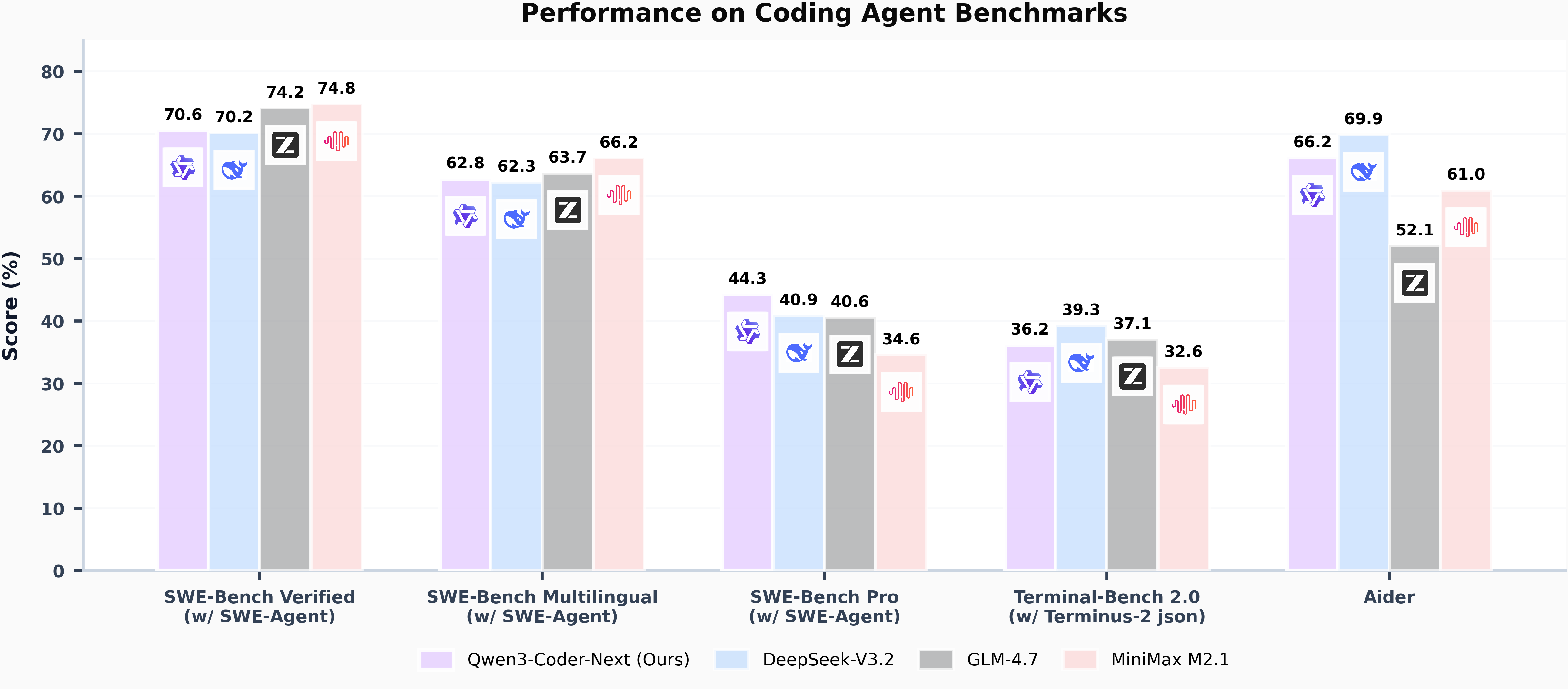
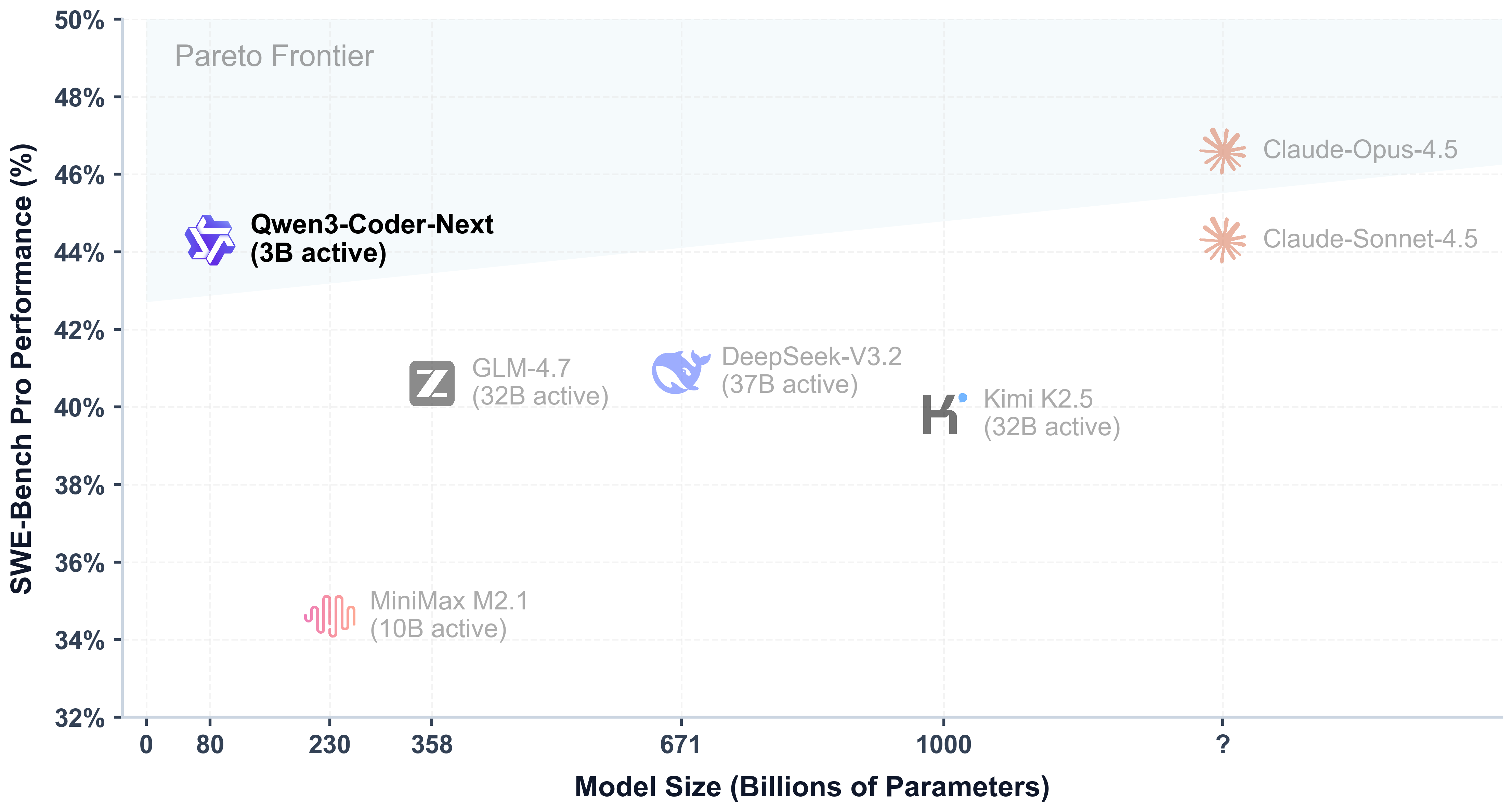
- Super Efficient with Significant Performance: With only 3B activated parameters (80B total parameters), it achieves performance comparable to models with 10–20x more active parameters, making it highly cost-effective for agent deployment.
- Advanced Agentic Capabilities: Through an elaborate training recipe, it excels at long-horizon reasoning, complex tool usage, and recovery from execution failures, ensuring robust performance in dynamic coding tasks.
- Versatile Integration with Real-World IDE: Its 256k context length, combined with adaptability to various scaffold templates, enables seamless integration with different CLI/IDE platforms (e.g., Claude Code, Qwen Code, Qoder, Kilo, Trae, Cline, etc.), supporting diverse development environments.
Model Overview
Qwen3-Coder-Next has the following features:
- Type: Causal Language Models
- Training Stage: Pretraining & Post-training
- Number of Parameters: 80B in total and 3B activated
- Number of Parameters (Non-Embedding): 79B
- Hidden Dimension: 2048
- Number of Layers: 48
- Hybrid Layout: 12 * (3 * (Gated DeltaNet -> MoE) -> 1 * (Gated Attention -> MoE))
- Gated Attention:
- Number of Attention Heads: 16 for Q and 2 for KV
- Head Dimension: 256
- Rotary Position Embedding Dimension: 64
- Gated DeltaNet:
- Number of Linear Attention Heads: 32 for V and 16 for QK
- Head Dimension: 128
- Mixture of Experts:
- Number of Experts: 512
- Number of Activated Experts: 10
- Number of Shared Experts: 1
- Expert Intermediate Dimension: 512
- Context Length: 262,144 natively
NOTE: This model supports only non-thinking mode and does not generate <think></think> blocks in its output. Meanwhile, specifying enable_thinking=False is no longer required.
For more details, including benchmark evaluation, hardware requirements, and inference performance, please refer to our blog, GitHub, and Documentation.
Quickstart
We advise you to use the latest version of transformers.
The following contains a code snippet illustrating how to use the model generate content based on given inputs.
from transformers import AutoModelForCausalLM, AutoTokenizer model_name = "Qwen/Qwen3-Coder-Next" # load the tokenizer and the modeltokenizer = AutoTokenizer.from_pretrained(model_name)model = AutoModelForCausalLM.from_pretrained( model_name, torch_dtype="auto", device_map="auto") # prepare the model inputprompt = "Write a quick sort algorithm."messages = [ {"role": "user", "content": prompt}]text = tokenizer.apply_chat_template( messages, tokenize=False, add_generation_prompt=True,)model_inputs = tokenizer([text], return_tensors="pt").to(model.device) # conduct text completiongenerated_ids = model.generate( **model_inputs, max_new_tokens=65536)output_ids = generated_ids[0][len(model_inputs.input_ids[0]):].tolist() content = tokenizer.decode(output_ids, skip_special_tokens=True) print("content:", content)
Note: If you encounter out-of-memory (OOM) issues, consider reducing the context length to a shorter value, such as 32,768.
For local use, applications such as Ollama, LMStudio, MLX-LM, llama.cpp, and KTransformers have also supported Qwen3.
Deployment
For deployment, you can use the latest sglang or vllm to create an OpenAI-compatible API endpoint.
SGLang
SGLang is a fast serving framework for large language models and vision language models.
SGLang could be used to launch a server with OpenAI-compatible API service.
sglang>=v0.5.8 is required for Qwen3-Coder-Next, which can be installed using:
pip install 'sglang[all]>=v0.5.8'
See its documentation for more details.
The following command can be used to create an API endpoint at http://localhost:30000/v1 with maximum context length 256K tokens using tensor parallel on 4 GPUs.
python -m sglang.launch_server --model Qwen/Qwen3-Coder-Next --port 30000 --tp-size 2 --tool-call-parser qwen3_coder
[!Note]
The default context length is 256K. Consider reducing the context length to a smaller value, e.g., 32768, if the server fails to start.
vLLM
vLLM is a high-throughput and memory-efficient inference and serving engine for LLMs.
vLLM could be used to launch a server with OpenAI-compatible API service.
vllm>=0.15.0 is required for Qwen3-Coder-Next, which can be installed using:
pip install 'vllm>=0.15.0'
See its documentation for more details.
The following command can be used to create an API endpoint at http://localhost:8000/v1 with maximum context length 256K tokens using tensor parallel on 4 GPUs.
vllm serve Qwen/Qwen3-Coder-Next --port 8000 --tensor-parallel-size 2 --enable-auto-tool-choice --tool-call-parser qwen3_coder
[!Note]
The default context length is 256K. Consider reducing the context length to a smaller value, e.g., 32768, if the server fails to start.
Agentic Coding
Qwen3-Coder-Next excels in tool calling capabilities.
You can simply define or use any tools as following example.
# Your tool implementationdef square_the_number(num: float) -> dict: return num ** 2 # Define Toolstools=[ { "type":"function", "function":{ "name": "square_the_number", "description": "output the square of the number.", "parameters": { "type": "object", "required": ["input_num"], "properties": { 'input_num': { 'type': 'number', 'description': 'input_num is a number that will be squared' } }, } } }] from openai import OpenAI# Define LLMclient = OpenAI( # Use a custom endpoint compatible with OpenAI API base_url='http://localhost:8000/v1', # api_base api_key="EMPTY") messages = [{'role': 'user', 'content': 'square the number 1024'}] completion = client.chat.completions.create( messages=messages, model="Qwen3-Coder-Next", max_tokens=65536, tools=tools,) print(completion.choices[0])
Best Practices
To achieve optimal performance, we recommend the following sampling parameters: temperature=1.0, top_p=0.95, top_k=40.
Citation
If you find our work helpful, feel free to give us a cite.
@techreport{qwen_qwen3_coder_next_tech_report, title = {Qwen3-Coder-Next Technical Report}, author = {{Qwen Team}}, url = {https://github.com/QwenLM/Qwen3-Coder/blob/main/qwen3_coder_next_tech_report.pdf}, note = {Accessed: 2026-02-03}}

