Photo-based held-out cases
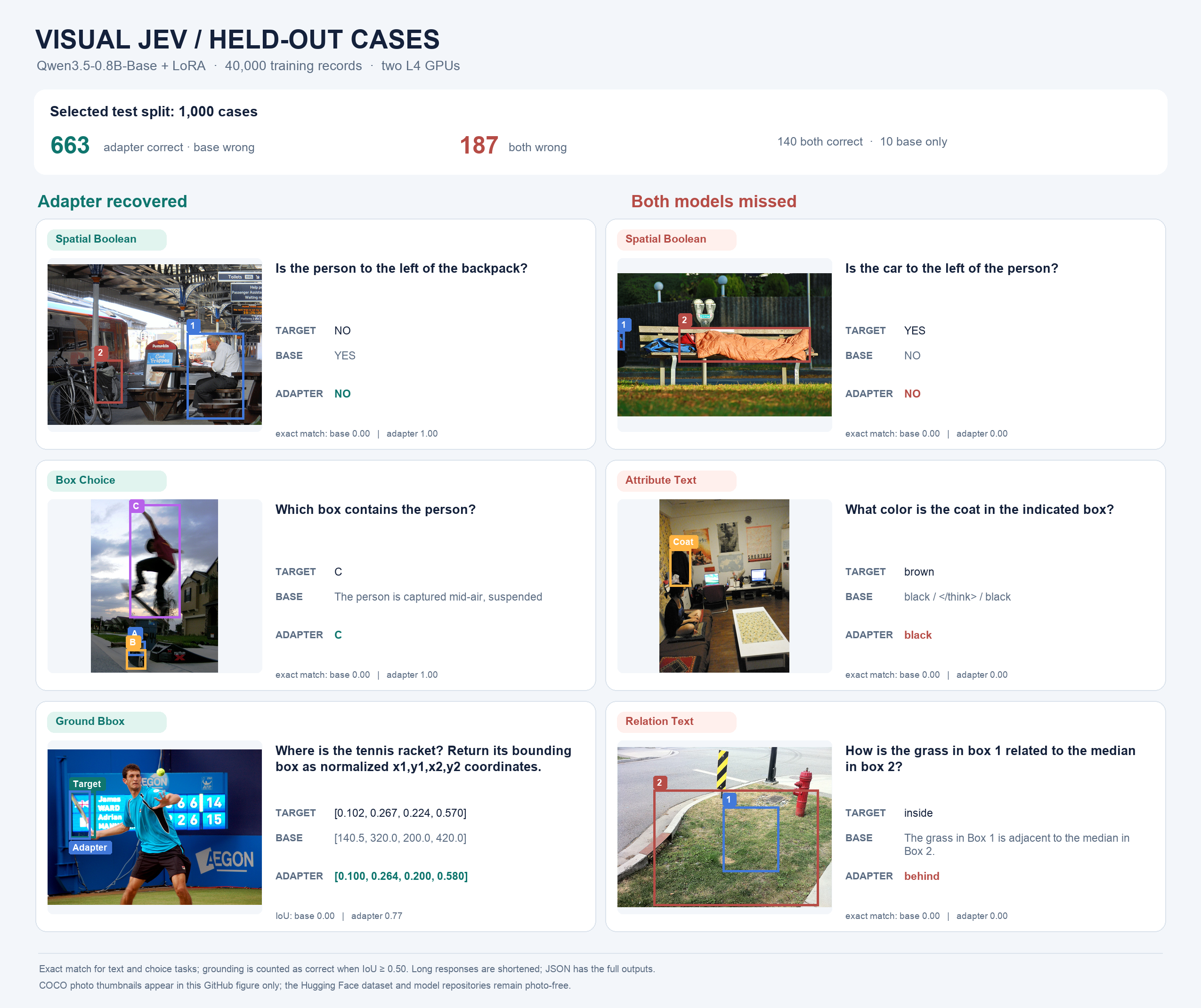
The GitHub composite shows selected held-out predictions with annotated photos. Its companion JSON retains full predictions.
How the dataset was created
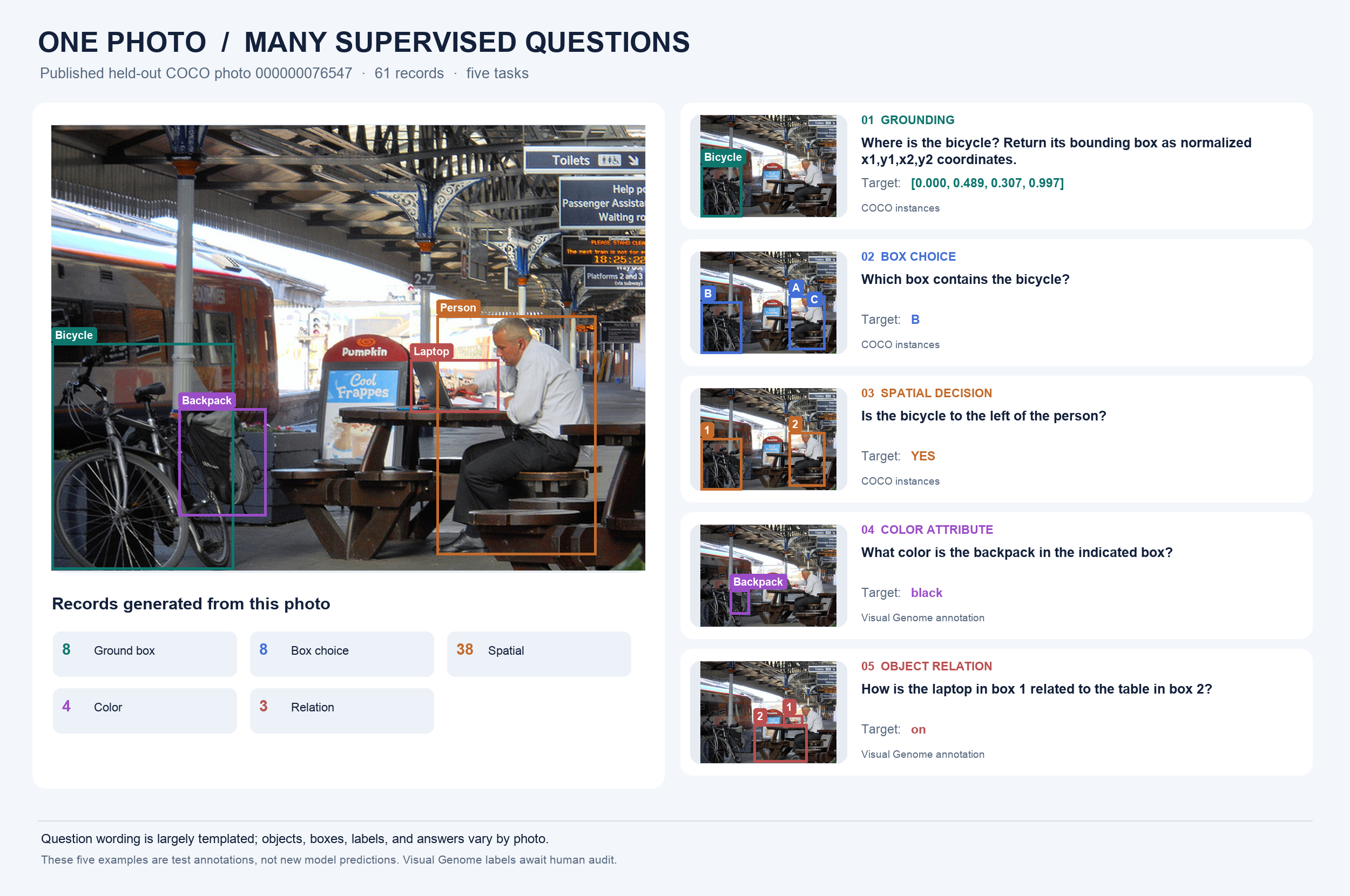
Published train and evaluation questions largely use five fixed templates. COCO instance annotations supply grounding, box choice, and left/right questions; Visual Genome v1.2 supplies selected color and relation labels. Objects, boxes, and targets vary by photo, and a photo yields only supported questions. The separate 6,823 Luna-generated candidate rows were excluded pending human review. This training result does not establish generalization to unfamiliar wording, counting, absence, or false premises. See the dataset creation guide.
One held-out COCO photo yields 61 published test rows across all five tasks. This GitHub-hosted composite shows one row per task with the actual photo; no photo bytes were uploaded to this model repository or the Hugging Face dataset.
Dataset and training
- Selection: per-task reservoir sampling with seed 43801 from the original image-disjoint train, validation, and test splits. Each task contributes 8,000 training, 200 validation, and 200 test records.
- Training: 40,000 unique rows in one epoch; 40,000 processed including distributed padding.
- Evaluation: all 1,000 rows of the selected validation subset and all 1,000 rows of the selected test subset. No full-split benchmark is claimed.
- Hardware: 2 × NVIDIA L4; elapsed 1.40 hours.
- Model: Qwen3.5-0.8B-Base, rank-16 LoRA on
q_proj and v_proj, AdamW learning rate 5e-05, gradient accumulation 16 per GPU. Images fit within 512 × 512 pixels.
- The generated-label
luna_candidates.jsonl shard was excluded because it awaits human audit. No photo bytes are hosted in the dataset or model repository.
Selected validation loss
Mean teacher-forced negative log-likelihood per row:
Table with columns: Task, Rows, Base, Adapter| Task | Rows | Base | Adapter |
|---|
| ground_bbox | 200 | 0.921 | 0.619 |
| box_choice | 200 | 1.027 | 0.058 |
| spatial_boolean | 200 | 0.430 | 0.075 |
| attribute_text | 200 | 1.559 | 0.248 |
| relation_text | 200 | 4.204 | 0.171 |
Selected held-out test generation
Grounding uses mean intersection-over-union; the other tasks use case-insensitive exact match after trimming terminal punctuation.
Table with columns: Task, Rows, Base, Adapter| Task | Rows | Base | Adapter |
|---|
| ground_bbox | 200 | 0.044 | 0.530 |
| box_choice | 200 | 0.000 | 0.940 |
| spatial_boolean | 200 | 0.710 | 0.900 |
| attribute_text | 200 | 0.005 | 0.785 |
| relation_text | 200 | 0.000 | 0.800 |
See metrics.json for exact values, predictions.jsonl for per-record targets and predictions, selection_manifest.json for sample counts and seed, and full_worker.py for prompt serialization.
Use with your own image
The Hub may not show an interactive widget for this adapter unless an Inference Provider serves it. Use the code below, not the Hub's generic PEFT popover: that popover loads AutoModelForCausalLM, which omits the vision tower. For a guided run, open the correct Colab notebook and set adapter_id to harshnandwana/visual-jev-budget20-qwen35-0.8b-lora in its model-loading cell. Colab uploads your chosen photo to your Google runtime. The example below runs locally: install torch, transformers>=5.6,<6, peft>=0.21.2, and pillow, then place your own photo at example.jpg.
import torchfrom PIL import Imagefrom transformers import AutoProcessor, Qwen3_5ForConditionalGenerationfrom peft import PeftModel base_id = "Qwen/Qwen3.5-0.8B-Base"adapter_id = "harshnandwana/visual-jev-budget20-qwen35-0.8b-lora"device = "cuda" if torch.cuda.is_available() else "cpu"dtype = torch.bfloat16 if device == "cuda" else torch.float32processor = AutoProcessor.from_pretrained(base_id)base = Qwen3_5ForConditionalGeneration.from_pretrained(base_id, dtype=dtype).to(device)model = PeftModel.from_pretrained(base, adapter_id).eval() with Image.open("example.jpg") as source: photo = source.convert("RGB") photo.thumbnail((512, 512)) messages = [{"role": "user", "content": [ {"type": "image", "image": photo}, {"type": "text", "text": "Is the person to the left of the backpack?\n" "Choices: YES, NO, UNKNOWN. Answer with one choice only."},]}]inputs = processor.apply_chat_template( messages, chat_template=processor.tokenizer.chat_template, tokenize=True, add_generation_prompt=True, return_dict=True, return_tensors="pt",).to(device)with torch.inference_mode(): tokens = model.generate(**inputs, max_new_tokens=32, do_sample=False)answer = processor.batch_decode( tokens[:, inputs["input_ids"].shape[1]:], skip_special_tokens=True,)[0].strip()print(answer)
For box choice, include candidate labels and normalized coordinates in the text prompt. For grounding, request a normalized [x1, y1, x2, y2] box. The command-line inference script supports all five tasks and keeps your photo local. The exact prompt formats are in full_worker.py. The model expects the image and task-specific question together; it is not a general chat assistant.
The adapter is a research demonstration. Visual Genome attributes and relations can be noisy; COCO geometric questions assume annotated objects are visible. Results do not establish OCR, exhaustive counting, calibrated UNKNOWN, or out-of-distribution performance.