- October 27, 2026
- 18 min read
The AI Coding Stack: Agents, Models, Inference, and GPUs
- An AI coding stack has four layers: agent, model, inference, and GPUs.
- Choices in one layer affect how the others perform.
- Cheaper per token isn’t always cheaper per task. A more capable model, extra reasoning, or a faster GPU setup can lower total cost if it avoids enough failed attempts.
- Test on your own tasks, one layer at a time, and measure cost per completed task.
You ask a coding agent to fix a bug. It inspects the code, makes a change, and runs the tests. When a test fails, the agent needs to understand what went wrong and decide what to try next. It might repeat an unsuccessful edit or lose track of a requirement, leading to more attempts or an incorrect fix. Even when it eventually fixes the bug, those additional attempts can increase the time and cost of completing the task.
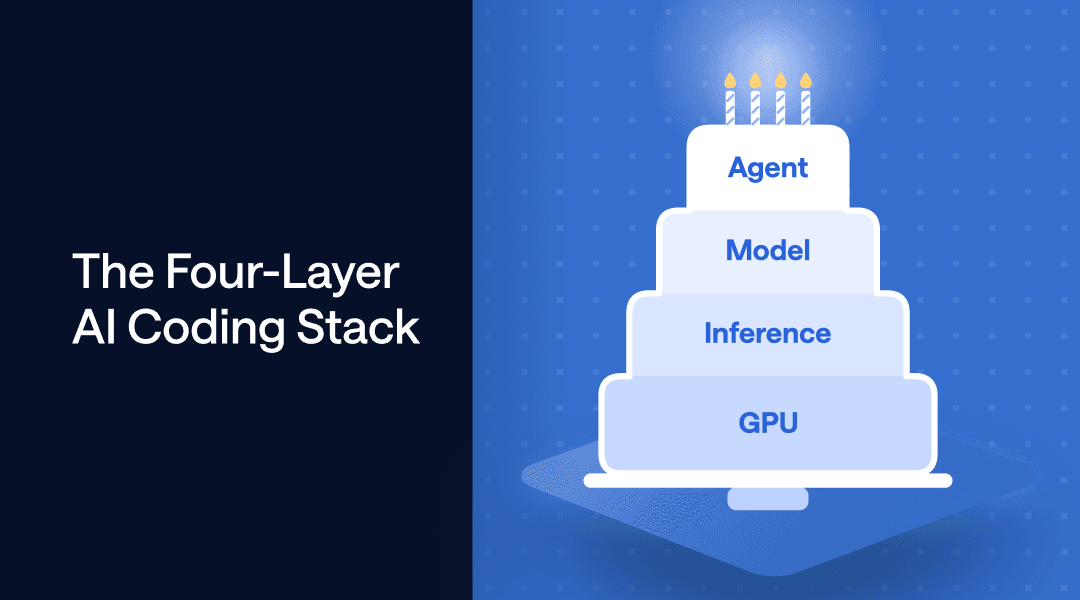
Figure 1. The four-layer AI coding stack. The agent harness supplies context and receives model-generated outputs through the inference system. The inference system runs the model, while GPU infrastructure provides the compute, memory, networking, and resource management that support execution.
These outcomes depend on how four layers of the AI coding stack work together (Figure 1):
- Agents. The agent harness coordinates the workflow, provides tools for interacting with the development environment, and manages the context available to the model.
- Models. The model uses that context to reason about the task and generate responses or tool calls.
- Inference. The inference system runs the model and manages request processing, including scheduling and caching.
- GPUs. GPU infrastructure provides compute, memory, and networking, along with the systems that allocate and manage those resources.
Choosing an AI coding stack means understanding how decisions at each layer affect task quality, time, and cost. In this post, we'll first look at how the layers interact, examine the trade-offs within and between layers, and finish with a practical method for comparing setups on your own tasks.
How One Decision Affects the Whole Stack
When a coding agent fails to fix a bug, the agent harness must decide how much history from previous attempts to keep in the context for the next model request. Keeping the full history helps the model understand what went wrong and avoid repeating mistakes, but it also makes the input longer. Summarizing earlier attempts reduces input tokens, but it may remove useful information or reduce prefix cache reuse if it changes the previously shared prefix.
This means shorter inputs do not always lead to lower overall costs. If a summary causes the model to repeat a failed approach, the extra model calls and test runs may cost more than the tokens saved. At the same time, a longer history may be less expensive than expected when the inference system can reuse cached prefixes. That reuse also depends on available cache capacity and how the inference system manages its cache.
The key point is that the agent harness's decisions affect both how well the model solves the problem and how efficiently the inference system processes requests. Improving overall efficiency therefore requires both optimizing each layer and understanding how the layers interact.
Agents
A coding agent combines a model with a harness. The model interprets evidence and proposes actions; the harness manages the context, tools, and workflow around it. For the next attempt at our bug fix, these responsibilities determine what information reaches the model, how it executes actions, and how the work proceeds.
Figure 2. The Agent Harness. Context management supports memory, action space enables execution, and task orchestration supports planning and coordination.
Context Management
Context management determines what information the model receives at each step. The harness brings together the user’s request, project instructions, relevant code, and results from previous actions. As the task progresses, it decides what to keep in context, retrieve when needed, or summarize.
Project instructions often come from files such as AGENTS.md, which can describe coding conventions and test commands. Some harnesses use additional files. OpenClaw, for example, uses SOUL.md for behavior and tone and IDENTITY.md for the agent’s name and other identity details. Which files are loaded, and when, depends on the harness.
In our bug-fixing example, the model needs both the failed test output and the instruction to preserve the public API. If that instruction is lost from context, the model might produce a patch that passes the test but violates the original requirement. When comparing harnesses, check whether important instructions remain available after several rounds of edits and tests, particularly when older history has been summarized.
Action Space
The action space defines how the model can interact with the development environment. For our bug fix, this includes searching code, editing files, and running terminal commands. The harness exposes these operations through dedicated tools, a general-purpose shell, or both. Tool descriptions and input schemas guide how the model requests an action; returned results provide evidence for its next decision.
With a large tool catalog, tool search lets the model look up relevant tool definitions on demand instead of loading all of them into every request. If the failure occurs in CI, for example, the agent might discover a tool for retrieving CI logs only when it needs one. This reduces context spent on unused definitions but adds a discovery step before execution. The model must successfully find the relevant capability before it can use it.
Choose a harness that supports the actions your tasks require. Fixing a failing unit test may need only repository access and a shell. Investigating a UI bug may also require opening the application, reproducing an interaction, and inspecting screenshots. Check whether the harness supports these operations through its existing tools and whether you can extend it when your workflow requires additional capabilities.
Task Orchestration
Task orchestration supports planning and coordination as work progresses. The model may propose or revise a plan, while the harness provides mechanisms to track progress, manage dependencies, and control when execution continues or stops. After our failed test, the workflow can return to diagnosis and require checks on the revised patch before accepting completion.
Most harnesses today support subagents for independent investigations. One could examine the suspected cause while another reviews existing test coverage. Each needs the relevant context and tools, and the main agent must reconcile their findings and verify the final fix. Parallel work may reduce elapsed time, but it also adds model calls and coordination overhead. For a small bug, delegation may cost more than it saves.
Match orchestration to how you want to work with the agent. For short tasks, look for a workflow that makes it easy to review edits and give feedback. For longer tasks, check whether the harness tracks unfinished work, preserves progress across interruptions, and lets you redirect the agent. If you use subagents, check whether you can monitor their assignments and whether the final checks run against the combined changes before the task is marked complete.
Evaluating the Harness
Coding agent benchmarks are useful for comparing coding performance, but they are only part of the decision. Different agent harnesses offer different approaches to task orchestration, tool use, and context management. An agent that handles complex, multi-step tasks well may be a good fit for large code changes or debugging, while a simpler, more responsive workflow may be preferable for quick edits and everyday coding tasks.
Because you interact with the agent throughout your coding workflow, your own experience matters too. Try several agents on representative tasks and compare how well they preserve requirements, use available tools, recover from failures, and let you review or redirect their work.
Models
With the failed patch and test output in context, the model must decide what to try next. It might request more code, propose another edit, or ask for a test run. Choosing a model means assessing how reliably it can make these decisions and how much work it needs to reach a correct fix.
Figure 3. The Model Layer. The model runs on an inference system to generate text or tool calls.
Model Size
Model size refers to the number of learned parameters. More parameters can increase a model’s capacity to learn complex relationships, but coding ability also depends on architecture and training. In our bug-fixing example, greater capability matters if it helps the model diagnose the problem correctly and avoid unsuccessful edits.
Larger models generally require more memory to store their weights at the same numerical precision, but computational requirements also depend on architecture. A mixture-of-experts (MoE) model, for example, activates only a subset of its parameters for each token, reducing computation relative to activating all parameters.
Model size alone therefore does not determine which model is more efficient for a coding task. A more capable model may complete a difficult fix in fewer attempts, offsetting its higher per-response cost. If a smaller model already completes the task reliably, a larger model may offer little additional benefit.
Context Window
The context window defines the maximum number of tokens a model can process in a single request, including input and generated output. A larger window lets the model consider more code, requirements, and tool results together. In our bug fix, that means comparing the failing function with its callers and tests to assess how a proposed change affects the surrounding code. More capacity also gives the agent room to carry earlier findings and attempted fixes through a longer investigation, keeping that evidence available for subsequent decisions.
Modality
Modality describes the input and output types a model supports. Source code, instructions, and test logs are text inputs. Models with image or video support can also examine screenshots or recordings of an interaction alongside the code.
For a layout bug, a screenshot may reveal a problem that the test output does not explain. Using that evidence requires compatible support across the model, harness, and inference endpoint. Choose a model that supports the input types your coding tasks require.
Reasoning Behavior
Reasoning behavior describes how the model works through a task, including how much reasoning it performs before acting and how it revises its approach after receiving new evidence. Some models expose controls such as thinking modes or reasoning budgets, allowing applications to adjust this effort.
For a subtle bug, additional reasoning may help the model choose a better diagnostic step and avoid several edit-test cycles. For a routine change, it may add delay without improving the patch. Fewer agent turns do not necessarily mean lower token usage. Evaluate reasoning settings based on task success, completion time, and total cost.
Evaluating the Model
Benchmark scores can help you decide which models to test, but models with similar scores may perform differently on your coding tasks. Complex fixes may justify paying for greater capability, while a less expensive model may handle routine edits reliably. Compare models on representative tasks using the same harness where possible. Measure task success, completion time, and total cost, and record model versions, reasoning settings, and serving configurations. A higher price per token can still mean a cheaper completed task if the model avoids enough failed attempts.
Claude Code and Codex make their default models easy to use. Where your harness supports alternatives, open-weight models may offer the quality you need at a lower cost. They also let you choose among compatible inference providers or run your own deployment. This flexibility lets you compare inference setups while keeping the model fixed. Next, we’ll examine how those serving choices affect response speed and cost.
Inference
Every model call in our bug fix passes through an inference system. It processes the supplied context to generate the response with the model. Because the agent may repeat this process many times before reaching a verified fix, serving behavior affects both the wait between actions and the resources consumed by the task.
Figure 4. The Inference System. Requests move through routing, scheduling, model execution, and response generation.
Request Routing
Request routing determines which serving worker handles each model call. A deployment may have several workers serving the same model, and the router distributes requests among them based on factors such as availability, current load, and cached context.
In our bug fix, sending the next request to a worker that holds cached state for the matching input prefix can reduce repeated computation. That worker may already be busy; however, another could begin processing sooner. Cache-aware routing considers both reuse and worker load, since queue wait times can offset the time saved through caching. Routing also helps a deployment use additional capacity as it scales. When new workers become available, the router can direct incoming requests to them, spreading the load and allowing more agents to run concurrently.
Computation Efficiency
Computation efficiency determines how effectively the inference system uses GPU resources to process inputs and generate outputs. Inference typically involves prefill, which processes uncached input tokens, and decoding, which generates new tokens. Optimized GPU kernels perform these calculations more efficiently, reducing execution time and overhead.
Batching improves GPU utilization by processing multiple requests together. With continuous batching, completed requests leave the batch and new requests can join as generation proceeds. This keeps available capacity in use as agents submit requests of different lengths. The scheduler controls how much work runs together. Larger batches can improve overall throughput, but resource contention may increase individual request latency.
For a coding agent, both input processing and output generation contribute to the wait between actions. Time to first token captures only when output begins; the harness generally needs a complete tool call before it can proceed with the next edit or test.
Memory Management
Transformer models use a key-value cache, or KV cache, to retain attention state for previously processed tokens. The model reuses this state as it generates new tokens, avoiding repeated computation. Longer contexts and more concurrent requests increase the amount of cached state the inference system must manage.
Prefix caching enables reuse across requests. In our bug fix, successive calls may begin with the same instructions, code, and earlier attempts. If the corresponding cached state remains available, the system can reuse it and process only the uncached portion, such as the newly added test output. This reduces prefill work, while generating the next response still requires computation.
Efficient memory management reduces wasted space, allowing more requests and cached context to fit within the available GPU memory. The system must balance retaining state for future reuse against making room for active requests. Keeping useful state can save computation on later calls, while discarding it frees capacity for current work but may require processing the same input again when an agent returns.
Structured Generation
Structured generation constrains model output to a format defined by a schema or grammar. For tool calls, supported constraints can enforce schema-defined argument structures, including required fields and data types. Applying these constraints during generation reduces formatting errors that would otherwise prevent the harness from executing a call.
Getting a tool call from the model to the harness also requires request formatting and tool-call parsing that match the model’s conventions. In our bug fix, a useful edit can still fail to reach execution if its arguments are incorrectly formatted or parsed. The serving interface must return the tool name and arguments in a form the harness can use. A correctly formatted call can still propose an incorrect patch, so the harness must verify the resulting changes.
Evaluating the Inference System
Serving performance depends on input and output lengths, concurrent demand, and opportunities for context reuse. Comparisons should reflect those conditions while keeping the harness, model version, and generation settings consistent where possible. Include both fresh requests and calls with reusable context, and record differences in numerical precision, context limits, and hardware where known.
The key measures are the response time and the throughput the system can sustain within your latency requirements. At the task level, compare success rate, completion time, and total cost. These results also depend on the compute, memory, and networking available to the inference system, which brings us to GPU infrastructure.
GPUs
The inference system relies on GPU infrastructure to run the model and store its state. As our bug-fixing session accumulates history or more agents run concurrently, the deployment needs enough resources to support that work. This layer determines which configurations can run, how much capacity they provide, and how reliably that capacity remains available.
Figure 5. GPU Infrastructure. GPU servers provide compute and memory, while networking, resource allocation, and health monitoring support their operation.
Compute and Memory
GPU compute performs the calculations needed to process the agent’s context and generate a response. GPU memory holds model weights, cached state from processed tokens, and temporary working data. Compute throughput influences how quickly requests run, while memory capacity limits how much model and request state the deployment can accommodate.
For coding agents, resource requirements can grow even when the model stays the same. Each round of code inspection, editing, and testing can add context, increasing both processing work and cache requirements. Multiple agents further strain that capacity. A deployment that handles a short prompt well may therefore struggle with long investigations or many simultaneous sessions.
Additional GPUs can provide more capacity, but their topology matters. A model spread across several devices requires those devices to exchange data during execution. Performance then depends on both the resources available and the connections between them, which brings us to networking.
Interconnects and Networking
Interconnects link GPUs within a server, while networks connect servers. When a model runs across multiple GPUs, these connections carry data exchanged during execution. Slow communication can leave GPUs waiting for one another, limiting the benefit of additional compute. Two deployments with the same model and GPU count can therefore perform differently because of how their devices are connected.
How those GPUs are used also matters. Distributing one model across devices can help it fit and may speed up individual requests, but it adds communication overhead. Adding independent replicas lets separate model instances serve different requests, increasing capacity for concurrent agents. Extra replicas can reduce queues under load, while offering little improvement to a single agent whose requests are already being served promptly.
For coding agent users, this distinguishes two goals: getting each model response sooner and supporting more agents at once. Each goal can require a different deployment configuration. Resource allocation determines where those deployments run and whether suitable GPUs and connections are available.
Resource Allocation
Resource allocation assigns GPUs to inference deployments and adjusts that allocation as demand changes. Each deployment needs devices with sufficient memory and suitable connections. The infrastructure scheduler places deployments on those resources; the inference scheduler then manages requests within each running deployment.
For coding agents, this matters when demand rises suddenly. Starting several sessions or launching subagents can create a burst of model requests, but additional serving capacity takes time to become ready. The system must allocate GPUs, load model weights, and initialize the runtime. Requests may queue during that process, even when the service is configured to scale automatically.
Keeping spare replicas warm absorbs bursts immediately but costs money while that capacity sits idle. Allocating resources only when demand rises reduces idle costs but can introduce startup delays. A deployment that performs well under steady load may therefore respond differently when many agents start working together. Once capacity is running, health monitoring and recovery determine whether it remains available.
Reliability and Availability
Reliability and availability determine whether infrastructure can keep serving requests and restore service when something fails. Health monitoring detects GPU, memory, and communication faults, while reliable power and cooling support stable operation. Recovery mechanisms must then restore affected deployments or direct requests to healthy capacity.
For coding agents, preserving task history does not eliminate the cost of an infrastructure failure. The harness may still hold the instructions, previous edits, and test results, while a failed serving worker loses its cached state. A replacement worker may need to reload the model and process that history again before returning a response. The agent can retain its progress yet still experience a substantial pause.
Evaluating GPU Infrastructure
Infrastructure costs depend on the complete deployment needed to meet your workload’s requirements. That includes the number of GPUs, capacity kept ready for bursts or failures, and operational work. A higher-priced GPU can lower total cost if it sufficiently reduces the required device count or task completion time. A smaller deployment may be more economical for lighter workloads.
The final evaluation brings all four layers together: whether the harness, model, inference system, and GPU infrastructure complete your coding tasks correctly within your time and cost constraints.
Build and Test Your AI Coding Stack
Return to the bug that opened this article. The outcome you want is a correct, reviewable fix delivered within your time and cost constraints. Comparing complete tasks shows how well a stack meets those requirements; understanding the four layers helps you decide what to improve.
To compare stacks on your own work:
- Use your own tasks. Pick representative tasks from your backlog, such as small fixes, multi-file changes, and a longer investigation, each with a check that defines done.
- Change one layer at a time. Keep the harness, model version, and generation settings fixed while you compare inference providers, and keep the inference setup fixed while you compare models.
- Run each task several times. Agent runs vary, so a single success or failure says little. Include realistic concurrency if several agents or subagents will run at once.
- Measure cost per completed task. Track success rate, time to a verified fix, and total spend including failed attempts, then divide spend by the number of tasks completed correctly.
For a playful recap, try Stack Your AI Coding Cake, our interactive stacking game.
FriendliAI focuses on the inference layer, serving open-weight models. Our founding team introduced continuous batching described above in the Orca paper (OSDI 2022). We provide integrations for coding agents, including Claude Code and Codex, so you can evaluate our serving setup with a familiar harness.
Choose a model available on both FriendliAI and your comparison provider, keep the harness and model settings consistent, and apply the method above to your own tasks.
Written by
FriendliAI Tech & Research
Share
General FAQ
Still have questions?
If you want a customized solution for that key issue that is slowing your growth, support@friendli.ai or click Talk to an engineer — our engineers (not a bot) will reply within one business day.