- April 29, 2026
- 4 min read
Scale Beyond GPU Memory Limits with Host KV Cache for Dedicated Endpoints
- Host KV Cache extends KV cache storage into host (CPU) memory, increasing capacity beyond GPU VRAM limits without extra hardware.
- When GPU VRAM fills up, FriendliAI offloads cache overflow to host memory and transfers it back when needed for active inference.
- Best fit: long-context, high-concurrency workloads, or those with repeated context — multi-turn conversations, document Q&A, code assistants over large codebases. Short-context, low-concurrency endpoints typically don’t need it.
- Enable Host KV Cache at endpoint creation on Friendli Dedicated Endpoints — no API changes required.
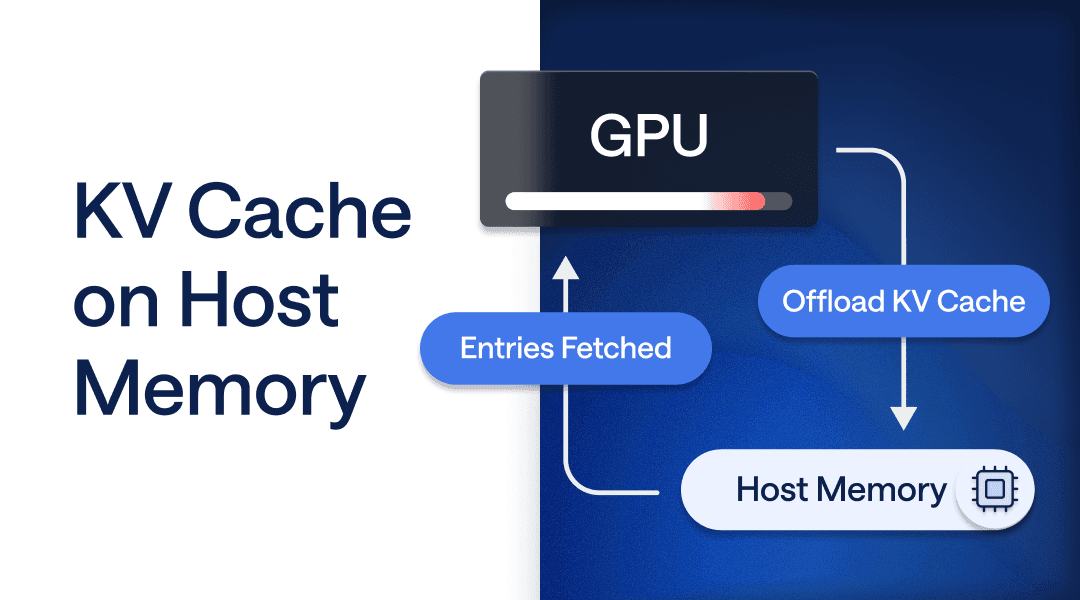
GPU memory is a finite resource. Model weights and active inference take priority over cache. After model weights and active inference use the memory they need, long-context workloads quickly fill the remaining capacity with KV cache. Host KV Cache is a new feature on Friendli Dedicated Endpoints that extends KV cache storage into host (CPU) memory, increasing total cache capacity without requiring additional GPU hardware.
What Is KV Cache, and Why Does It Matter?
Transformer models use a self-attention mechanism that projects each token’s hidden state into key (K) and value (V) vectors at every layer. To generate each new output token, the model attends over the K and V tensors of all preceding tokens — scoring queries against keys to determine relevance, then aggregating values accordingly. Storing those tensors rather than recomputing them on every forward pass is what makes multi-turn conversations and long system prompts fast. Without a KV cache, every request processes the full context from scratch.
This matters especially because LLM generation is autoregressive: the model produces one token at a time, each attending over the full context so far. Without a KV cache, generating 500 tokens from a 10,000-token prompt means rerunning the full attention computation — recomputing K and V for all 10,000 prior tokens — 500 separate times. The cache eliminates that redundancy, so generating each new token avoids recomputing K and V for the entire prior sequence — keeping per-token compute efficient as sequences grow.
The catch: KV caches live in GPU VRAM. At high concurrency or with long contexts, they can consume the majority of available memory. Once the cache fills up, entries get evicted — hurting hit rates.
How Host KV Cache Works
Host KV Cache attaches additional host memory for KV cache storage, extending total KV capacity beyond GPU memory limits. When GPU VRAM fills up, instead of evicting cache entries, FriendliAI transparently offloads to host memory. Cache entries are transferred back to GPU VRAM when needed for active inference. The result: cache capacity that scales with system memory, not just GPU VRAM.
When to Enable Host KV Cache
Host KV Cache is a targeted tool, not a default setting. Although Host KV Cache may extend endpoint initialization time, it’s worth enabling when the workload benefits from extra cache capacity.
Enable Host KV Cache when:
- Long-context workloads are the norm — extended system prompts, multi-turn conversations, document Q&A, or code assistants over large codebases.
- Model weights already consume most of your VRAM, leaving thin headroom for the cache.
- You’re reaching endpoint performance ceilings at peak concurrency.
Skip it when:
- Your workload is short-context and low-concurrency, and current VRAM headroom is comfortable.
- You’re running on hardware with ample VRAM relative to your typical context length and concurrency.
Rule of thumb: if you’re hitting cache pressure as context length or concurrency grows, turn it on. If your endpoint runs comfortably on VRAM today and your contexts are short, the added initialization time isn’t worth it.
Getting Started
Host KV Cache is available now on Friendli Dedicated Endpoints. Enable it at endpoint creation — no changes to your API calls are required. Inference requests to that endpoint use the extended cache automatically when they need it. Review the Host KV Cache documentation for full configuration details.
Setup
- Create a FriendliAI account
- Create your Dedicated Endpoint and API token
- Enable Host KV Cache during endpoint configuration
Note: When Host KV Cache is enabled, the endpoint may take additional time to become active due to the extra memory allocation and initialization process.
Enabling Host KV Cache in the Friendli Suite
Host KV Cache is available as a one-click toggle when you create or edit a Dedicated Endpoint in the Friendli Suite. Enable it on the endpoint configuration page, and FriendliAI handles the rest — no code changes, no infrastructure setup.
Once enabled, Host KV Cache works automatically: KV cache entries that exceed GPU memory are offloaded to host (CPU) memory and pulled back when needed, with no further configuration required. You can also configure Host KV Cache programmatically using the Python SDK.
Start Optimizing Your Deployment
Host KV Cache scales cache capacity beyond GPU memory for the workloads that need it most: multi-turn conversations with long message histories, document Q&A over full context, and code assistants operating across large codebases. If you're running long-context inference on GPU today, you're likely leaving both capacity and throughput on the table.
FriendliAI ranks at the top of public leaderboards published by OpenRouter and Artificial Analysis across response times, output speed, uptime, tool calling, and structured outputs — for the open-weight models you're already running. Host KV Cache is how you keep that performance intact as context length grows.
Enable Host KV Cache on Friendli Dedicated Endpoints today.
Written by
FriendliAI Tech & Research
Share
General FAQ
Still have questions?
If you want a customized solution for that key issue that is slowing your growth, support@friendli.ai or click Talk to an engineer — our engineers (not a bot) will reply within one business day.

