Highlights
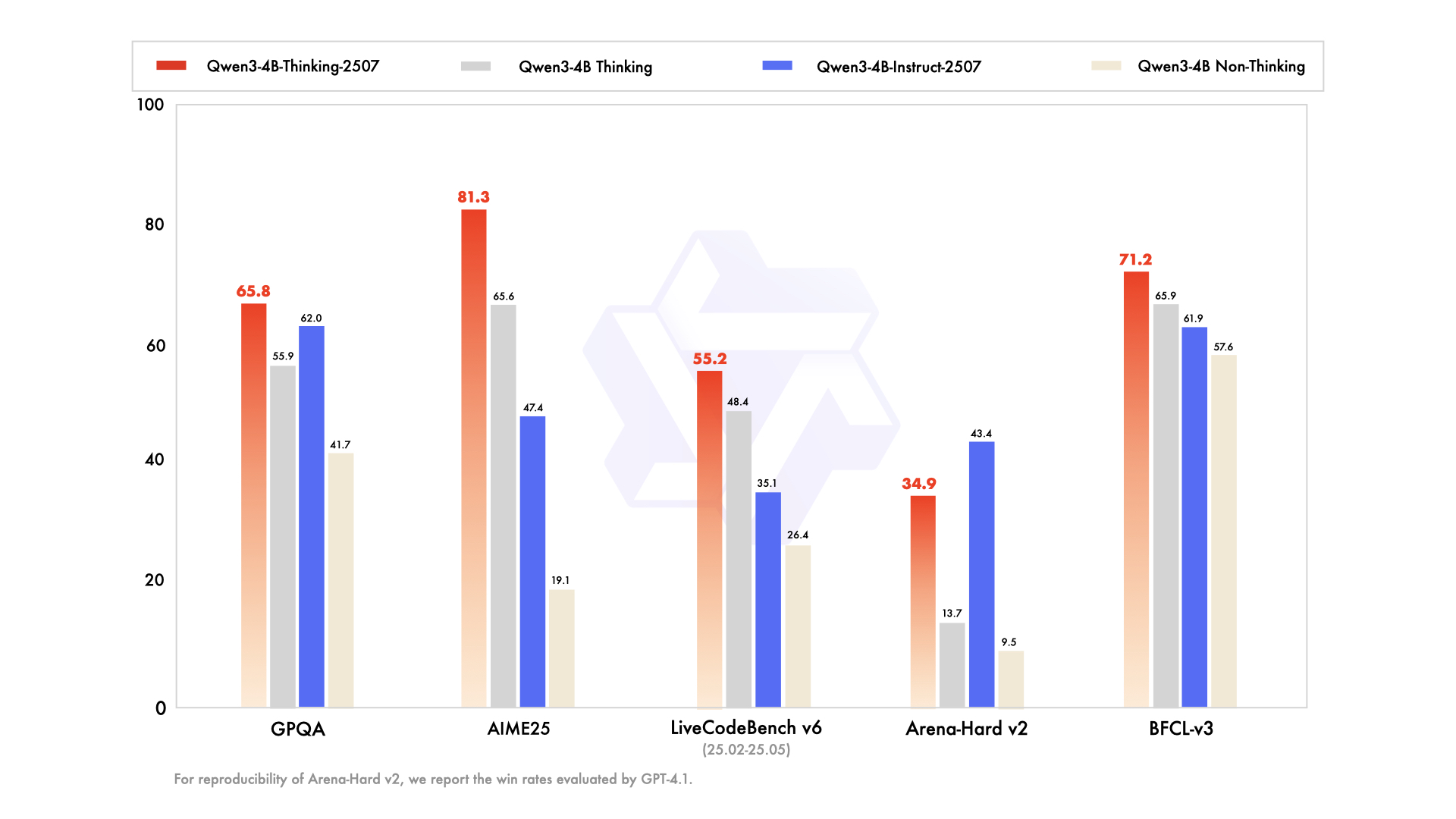
We introduce the updated version of the Qwen3-4B non-thinking mode, named Qwen3-4B-Instruct-2507, featuring the following key enhancements:
- Significant improvements in general capabilities, including instruction following, logical reasoning, text comprehension, mathematics, science, coding and tool usage.
- Substantial gains in long-tail knowledge coverage across multiple languages.
- Markedly better alignment with user preferences in subjective and open-ended tasks, enabling more helpful responses and higher-quality text generation.
- Enhanced capabilities in 256K long-context understanding.
Model Overview
Qwen3-4B-Instruct-2507 has the following features:
- Type: Causal Language Models
- Training Stage: Pretraining & Post-training
- Number of Parameters: 4.0B
- Number of Paramaters (Non-Embedding): 3.6B
- Number of Layers: 36
- Number of Attention Heads (GQA): 32 for Q and 8 for KV
- Context Length: 262,144 natively.
NOTE: This model supports only non-thinking mode and does not generate <think></think> blocks in its output. Meanwhile, specifying enable_thinking=False is no longer required.
For more details, including benchmark evaluation, hardware requirements, and inference performance, please refer to our blog, GitHub, and Documentation.
Table with columns: GPT-4.1-nano-2025-04-14, Qwen3-30B-A3B Non-Thinking, Qwen3-4B Non-Thinking, Qwen3-4B-Instruct-2507 | GPT-4.1-nano-2025-04-14 | Qwen3-30B-A3B Non-Thinking | Qwen3-4B Non-Thinking | Qwen3-4B-Instruct-2507 |
|---|
| Knowledge | | | | |
| MMLU-Pro | 62.8 | 69.1 | 58.0 | 69.6 |
| MMLU-Redux | 80.2 | 84.1 | 77.3 | |
*: For reproducibility, we report the win rates evaluated by GPT-4.1.
Quickstart
The code of Qwen3 has been in the latest Hugging Face transformers and we advise you to use the latest version of transformers.
With transformers<4.51.0, you will encounter the following error:
The following contains a code snippet illustrating how to use the model generate content based on given inputs.
from transformers import AutoModelForCausalLM, AutoTokenizer
model_name = "Qwen/Qwen3-4B-Instruct-2507"
tokenizer = AutoTokenizer.from_pretrained(model_name)
model = AutoModelForCausalLM.from_pretrained(
model_name,
torch_dtype="auto",
device_map="auto"
)
prompt = "Give me a short introduction to large language model."
messages = [
{"role": "user", "content": prompt}
]
text = tokenizer.apply_chat_template(
messages,
tokenize=False,
add_generation_prompt=True,
)
model_inputs = tokenizer([text], return_tensors="pt").to(model.device)
generated_ids = model.generate(
**model_inputs,
max_new_tokens=16384
)
output_ids = generated_ids[0][len(model_inputs.input_ids[0]):].tolist()
content = tokenizer.decode(output_ids, skip_special_tokens=True)
print("content:", content)
For deployment, you can use sglang>=0.4.6.post1 or vllm>=0.8.5 or to create an OpenAI-compatible API endpoint:
Note: If you encounter out-of-memory (OOM) issues, consider reducing the context length to a shorter value, such as 32,768.
For local use, applications such as Ollama, LMStudio, MLX-LM, llama.cpp, and KTransformers have also supported Qwen3.
Agentic Use
Qwen3 excels in tool calling capabilities. We recommend using Qwen-Agent to make the best use of agentic ability of Qwen3. Qwen-Agent encapsulates tool-calling templates and tool-calling parsers internally, greatly reducing coding complexity.
To define the available tools, you can use the MCP configuration file, use the integrated tool of Qwen-Agent, or integrate other tools by yourself.
from qwen_agent.agents import Assistant
llm_cfg = {
'model': 'Qwen3-4B-Instruct-2507',
'model_server': 'http://localhost:8000/v1',
'api_key': 'EMPTY',
}
tools = [
{'mcpServers': {
'time': {
'command': 'uvx',
'args': ['mcp-server-time', '--local-timezone=Asia/Shanghai']
},
"fetch": {
"command": "uvx",
"args": ["mcp-server-fetch"]
}
}
},
'code_interpreter',
]
bot = Assistant(llm=llm_cfg, function_list=tools)
messages = [{'role': 'user', 'content': 'https://qwenlm.github.io/blog/ Introduce the latest developments of Qwen'}]
for responses in bot.run(messages=messages):
pass
print(responses)
Best Practices
To achieve optimal performance, we recommend the following settings:
-
Sampling Parameters:
- We suggest using
Temperature=0.7, TopP=0.8, TopK=20, and MinP=0.
- For supported frameworks, you can adjust the
presence_penalty parameter between 0 and 2 to reduce endless repetitions. However, using a higher value may occasionally result in language mixing and a slight decrease in model performance.
-
Adequate Output Length: We recommend using an output length of 16,384 tokens for most queries, which is adequate for instruct models.
-
Standardize Output Format: We recommend using prompts to standardize model outputs when benchmarking.
- Math Problems: Include "Please reason step by step, and put your final answer within \boxed{}." in the prompt.
- : Add the following JSON structure to the prompt to standardize responses: "Please show your choice in the field with only the choice letter, e.g., ."
Citation
If you find our work helpful, feel free to give us a cite.
@misc{qwen3technicalreport,
title={Qwen3 Technical Report},
author={Qwen Team},
year={2025},
eprint={2505.09388},
archivePrefix={arXiv},
primaryClass={cs.CL},
url={https://arxiv.org/abs/2505.09388},
}